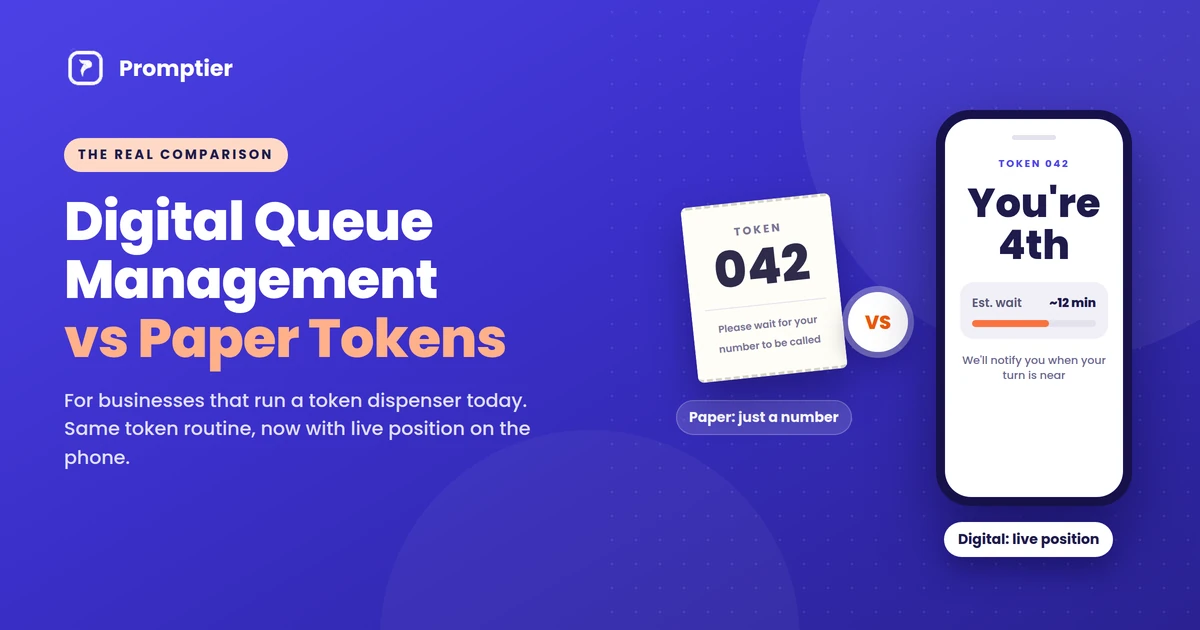
A digital queue management system and a paper token dispenser do the same basic job: they decide who gets served next. The difference is everything around that job. One hands your customer a slip with a number. The other puts their place in line on their phone, tells them how long the wait is, and records every visit.
If you already run a token dispenser, you’re not starting from zero. Your customers understand tokens, your staff know how to call numbers, and the system mostly works. So the real question isn’t “paper or digital?” in the abstract. It’s whether switching would make your counter noticeably better, and what you’d give up.
This guide compares the two side by side, point by point, from the view of a business that uses a token dispenser today.
A paper token system gives each customer a printed number and nothing else. A digital queue management system gives the same token number on the customer’s phone, plus their live position, an estimated wait and a notification when their turn is near. It needs no dispenser or paper, works on devices you already own, and logs every visit so you can see real wait times. Paper tokens still suit places where most customers don’t carry smartphones or the internet is unreliable.
Key Takeaways
- Both systems keep your “Token 42, Counter 3” routine. The digital version adds what the paper slip can’t: live position, estimated wait and a turn alert.
- A token dispenser is hardware. It needs paper rolls, servicing and a working printer. A digital system runs on phones, laptops and TVs you already have.
- Paper tokens leave no record. A digital system timestamps every visit, so you can see average waits, peak hours and which counter is overloaded.
- Paper still wins in a few places: very low smartphone use, weak connectivity, or a counter that serves only a handful of people a day.
- You don’t have to switch overnight. Many businesses run both for a few weeks, then retire the dispenser.
How a Paper Token System Works
A paper token system is the familiar box by the door. A customer presses a button, the machine prints a numbered slip, and a display near the counters shows which number is being served. Staff call the next number when they’re free.
It’s simple and it works. It stops people pushing to the front, and nobody needs a phone or any training. That’s why token dispensers are still common in banks, clinics, RTOs and service centres across India.
But the slip carries one piece of information: a number. It doesn’t tell the customer how many people are ahead, how long the wait will be, or when to come back. So customers stay in the waiting area and watch the display. And when the day ends, the business has no record of how long anyone actually waited.
How a Digital Queue Management System Works
A digital queue management system replaces the dispenser with a QR code and the customer’s own phone.
- The customer scans a QR code at the entrance with their phone camera.
- The queue opens in their browser. There’s no app to download and no sign up.
- They pick a service and get a token, the same kind of number they’d get from a dispenser.
- They see their live position and estimated wait, which update every time staff call someone.
- Staff call the next token from a dashboard on a phone or laptop, and the lobby TV shows who’s being served.
- The customer is notified on their phone as their turn approaches.
- Every step is timestamped, so the business gets real data on waits and busy hours.
The routine at the counter barely changes. Staff still call numbers and customers still go to the counter shown on the screen. What changes is that the customer knows where they stand, and you know what’s happening across the day.
Digital Queue Management vs Paper Tokens: Side by Side
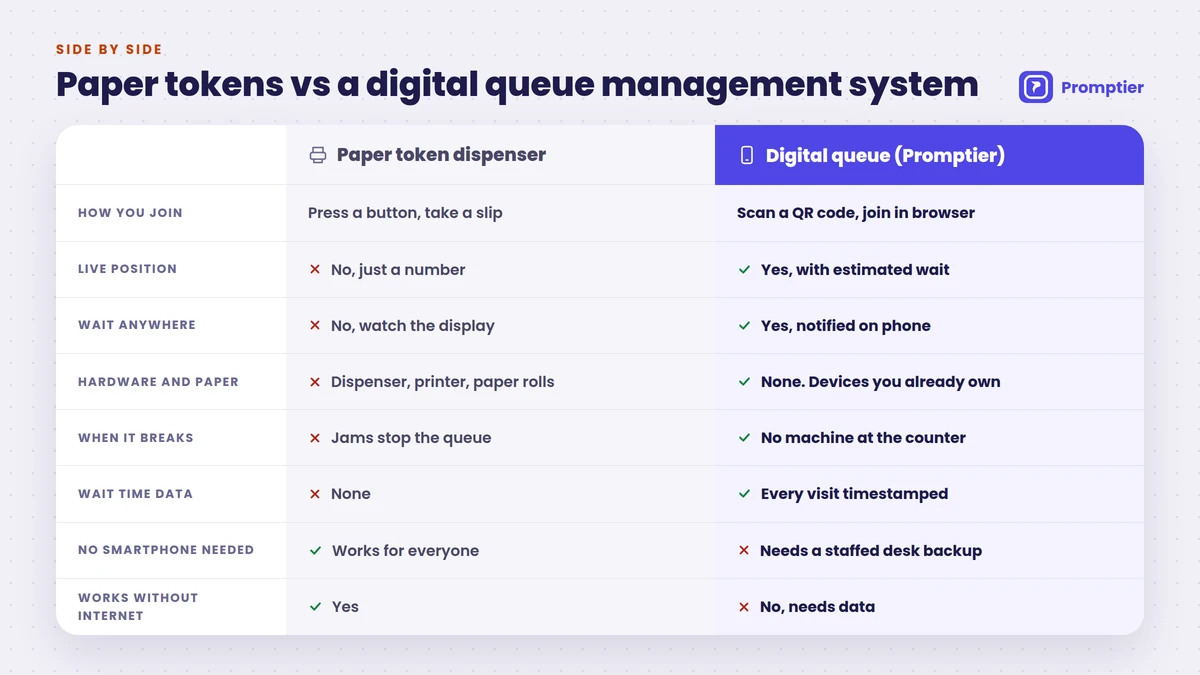
Here is the full comparison, point by point.
| Paper token system (dispenser) | Digital queue management system | |
|---|---|---|
| How customers join | Press a button, take a printed slip | Scan a QR code, join in the phone browser |
| What the customer gets | A number on paper | A token number plus live position and estimated wait |
| Knowing when to come back | Watch the display, stay nearby | Notified on their phone as their turn nears |
| Waiting area | Everyone waits in the room | Customers can wait anywhere |
| Hardware | Dispenser, printer, often a dedicated display | None new. Phones, laptops and an existing TV |
| Consumables | Paper rolls, sometimes ink | None |
| When it breaks | Jams or runs out of paper, and the queue stops | No machine at the counter to jam |
| Separate queues per service | Needs extra buttons or extra machines | Add a service in the dashboard in minutes |
| Setup | Vendor delivery and installation | Self setup, often live the same day |
| Records | None. The slip goes in the bin | Every visit timestamped |
| Wait time reports | Guesswork | Average waits, peak hours, counter load |
| Disputes (“my number was skipped”) | Hard to check | Timestamped record settles it |
| Customers without smartphones | Works for everyone | Needs a staffed desk or tablet as backup |
| Works without internet | Yes | No. Needs a data connection |
| Upfront cost | About ₹9,000 to ₹40,000+ per unit | Free to start, then a monthly plan |
The table shows a clear pattern. A digital queue management system wins on information, flexibility and upkeep. Paper tokens win on two things: they work for every customer, and they work with no internet at all.
What the Comparison Means Day to Day
For your customers
With a paper token, the wait is a blind spot. The customer holds token 42, sees 31 on the screen, and has no idea whether that means 10 minutes or 40. So they stay put, often standing, and ask the front desk for updates.
With a digital queue, the same customer sees “You’re 4th, about 12 minutes” on their phone. They can sit in the car, finish a call or grab tea, and come back when they’re notified. The wait may be just as long, but it feels shorter because they know what’s happening.
For your counter staff
Paper tokens leave staff answering the same question all day: “How much longer?” They also deal with the machine itself. They reload paper, clear jams, and sort out the argument when two people hold the same number or someone claims they were skipped.
A digital system takes most of that away. Customers can see their own position, so the questions drop. Staff call the next token with one tap, and there’s no printer to look after.
For you, the owner or manager
This is where the gap is widest. A token dispenser can’t tell you anything. You don’t know your average wait, your busiest hour, or whether Counter 2 is overloaded while Counter 4 sits idle.
A digital system records every visit with a timestamp. After a few weeks you can see, in real numbers, when to add a second person on the counter, which service slows the whole line, and whether your changes are working.
Where Paper Tokens Still Make Sense
A fair comparison has to say where paper wins. A token dispenser is still the better fit if:
- Most of your customers don’t carry smartphones. This is common in some rural outlets and among older customers.
- Your internet is unreliable. A digital queue needs a data connection for staff and customers.
- You serve only a few people a day. If there’s rarely more than two or three people waiting, a queue system of any kind may be more than you need.
For everyone else, the main reasons to keep a dispenser are habit and the money already spent on it. Neither is a strong reason to keep paying for paper rolls and repairs.
The Hidden Costs of a Token Dispenser
The purchase price is only the start. A dispenser in India typically costs about ₹9,000 for a basic thermal unit, up to ₹40,000 or more for a full electronic system with a display. On top of that come:
- Paper rolls, bought again and again
- Servicing and repairs, often under an annual maintenance contract
- Downtime, when the machine jams on a busy morning and the line turns into a crowd
- More hardware to grow, because adding a service or a counter often means another machine
A digital queue has none of these running costs. Promptier’s token management system is free to start, and the Pro plan costs ₹499 per month per location. For the full rupee breakdown, see our token machine vs digital queue cost comparison.
Can You Run Both?
Yes, and for most token dispenser users it’s the safest way to switch. Keep the dispenser running for a few weeks while you put up the QR code beside it. Regular customers can carry on as usual, and new or curious ones can try the phone queue.
Once most people are scanning instead of pressing the button, retire the dispenser. You can keep a staffed desk or a tablet at reception to add customers without smartphones to the same digital queue, so nobody is left out.
A Quick Test: Is It Time to Switch?
Tick the statements that apply to your counter:
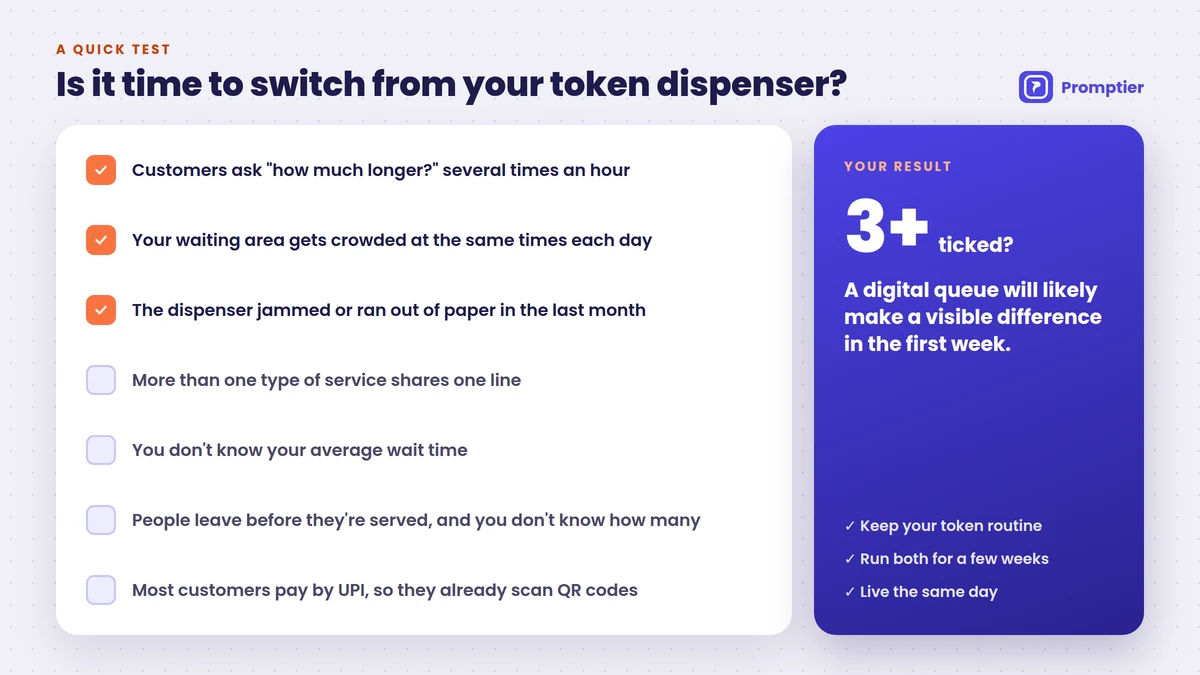
- Customers ask “how much longer?” several times an hour
- Your waiting area gets crowded at the same times each day
- The dispenser has jammed or run out of paper in the last month
- You have more than one type of service sharing one line
- You don’t know your average wait time
- People leave before they’re served, and you don’t know how many
- Most of your customers pay by UPI, so they’re used to scanning QR codes
If you ticked three or more, a digital queue will likely make a visible difference within the first week. The last point matters in India: UPI recorded 24.51 billion transactions in August 2026 alone (Business Standard, citing NPCI), and a large share of those start with a QR scan. Customers who pay by scanning already know how to join a queue by scanning.
How to Move From a Token Dispenser to Promptier
Promptier keeps the token routine your staff and customers already know, and moves it onto their phones. Most businesses are live the same day.
- Create your queues for each service, like “Cash”, “Enquiry” or “Consultation”.
- Print the QR code and place it right next to the dispenser, where regular customers already look.
- Open the display on your existing lobby TV, so called tokens show up just as before.
- Log in your staff on their phones or laptops and show them “call next”.
- Run both for a few weeks, then retire the dispenser once most customers are scanning.
For a step by step example with timings, see how to replace your bank’s token machine with a digital system.
See how Promptier replaces your token machine
Frequently Asked Questions
What is the difference between a digital queue management system and a paper token system?
A paper token system prints a numbered slip that shows only the customer’s number. A digital queue management system gives the same token on the customer’s phone, plus their live position, an estimated wait and a notification when their turn is near. It also records every visit, which a paper system can’t do.
Is a digital queue management system better than a token dispenser?
For most businesses, yes. It removes paper rolls and jams, lets customers wait anywhere, and gives you real wait time data. A token dispenser is still the better fit where most customers don’t have smartphones or the internet is unreliable.
Do customers need an app to use a digital queue?
No. With Promptier, customers scan a QR code and join in their phone browser. There’s nothing to download and no account to create.
What happens to customers who don’t have a smartphone?
Keep a staffed desk or a tablet at reception where staff can add them to the same queue. They’re called by token number just like everyone else.
Can I keep my token dispenser while I switch?
Yes. Many businesses run both for a few weeks. Put the QR code next to the dispenser, let customers choose, and retire the machine once most people are scanning.
How much does a digital queue management system cost compared with a token machine?
A token dispenser typically costs about ₹9,000 to ₹40,000 or more per unit, plus paper and servicing. Promptier is free to start, and its Pro plan costs ₹499 per month per location, with no hardware to buy.
How long does it take to switch?
Most businesses go live the same day. You create your services, print the QR code, open the display on an existing TV and log in your staff.
Conclusion
Paper tokens solved an old problem: stopping people from pushing to the front. A digital queue management system solves that too, then goes further. Customers know where they stand, staff stop answering “how much longer?”, and you finally see what’s happening at your counter.
If your dispenser still works, you don’t have to throw it out tomorrow. Put a QR code next to it, run both for a few weeks, and let your customers show you which one they prefer.
Ready to compare it at your own counter? Replace your token machine free with Promptier. No credit card, no hardware, support in IST hours.
Related reading
Leave a Reply