Tag: Queue Management System

  • QR Code Queue Management: How It Works (No App Needed)

    QR Code Queue Management: How It Works (No App Needed)

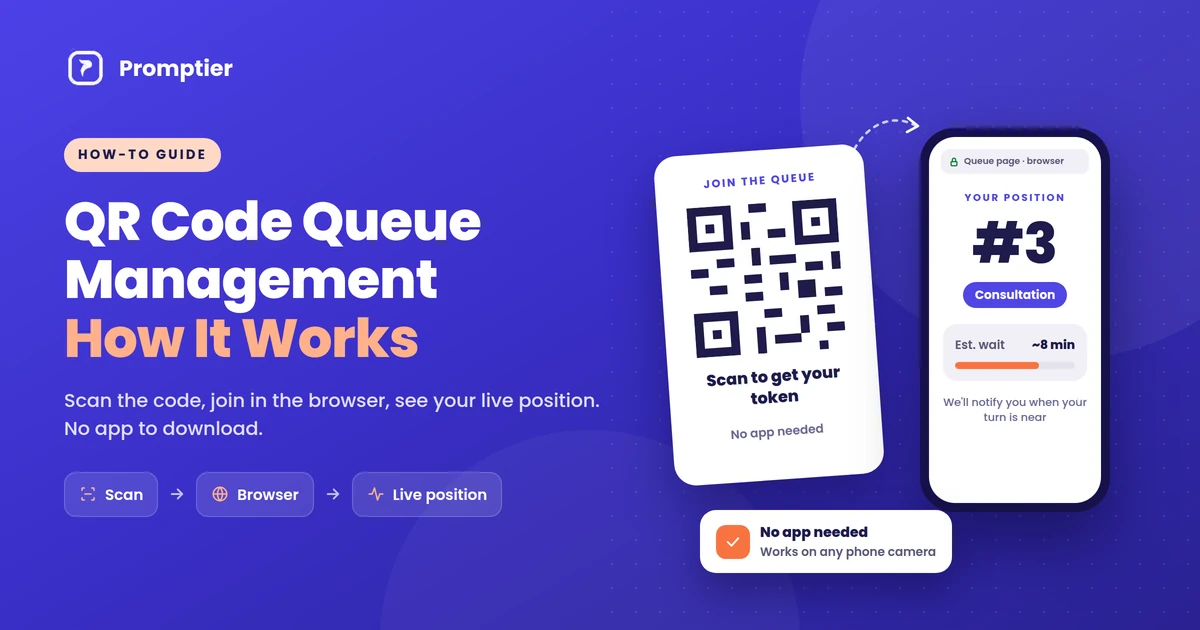
    QR code queue management lets customers join a line by scanning a QR code with their phone camera. The queue opens in their phone’s browser, they see their live position, and they’re notified when it’s their turn. There’s no app to download, no token slip and no standing in line.

    If you run a clinic, salon, bank branch or service counter, you’ve probably seen the moment it breaks down: a crowded waiting area, a receptionist answering “how much longer?” for the tenth time, and a paper token nobody can track. A QR code queue fixes that with a printed code and the phone already in your customer’s pocket.

    This guide explains exactly how it works, from the scan to the moment a customer is called, and what to look for when you set it up.

    QR code queue management works in four steps. A customer scans a QR code at your entrance. A queue page opens in their phone browser, with no app needed. They pick a service and join, then see their live position and estimated wait. When staff call the next customer from a dashboard, everyone’s position updates and the customer is notified as their turn nears.

    Key Takeaways

    • QR code queue management replaces token machines and paper registers with a printed QR code and the customer’s own phone.
    • No app is needed. Modern phone cameras read QR codes and open the queue as a web page in the browser.
    • Customers see their live position and estimated wait, and are notified as their turn approaches, so they can wait anywhere.
    • Staff run the queue from a dashboard on any phone or laptop, and every scan is timestamped for wait-time reports.
    • It suits India particularly well: UPI recorded 24.51 billion transactions in August 2026 alone, so scanning a QR code is already a daily habit for most customers.

    What Is QR Code Queue Management?

    QR code queue management is a way of running a waiting line where customers join by scanning a QR code instead of taking a paper token or standing in a physical line. The QR code links to a web page for your queue. Once a customer joins, their position is tracked digitally, updated in real time, and shown on their own phone.

    It’s a type of virtual queue: the customer holds a place in line without physically standing in it. The difference from older virtual queues is the entry point. Instead of downloading an app or calling a number, the customer just points their camera at a code.

    Key terms used in this guide:

    • QR code: a square barcode that stores a web address. Phone cameras can read it and open that address.
    • Virtual queue: a queue where people hold their place digitally and can wait anywhere.
    • Live position: the customer’s current place in the queue, updated every time staff call someone.
    • Staff dashboard: the screen staff use to see who’s waiting and call the next customer.
    • Queue display: a TV or monitor showing the token or name being served now.

    How QR Code Queue Management Works, Step by Step

    Here is the full journey, from the business printing a code to the customer being served.

    Step 1: The business puts up a QR code

    The business creates its queue, adds its services (for example, “Consultation” and “Reports”, or “Haircut” and “Colour”), and prints the QR code. It goes at the entrance, the reception desk and anywhere customers naturally stop. One printed code can be used every day.

    Step 2: The customer scans it with their phone camera

    The customer opens their phone camera and points it at the code. Built-in camera apps on iPhones and most Android phones recognise QR codes automatically and show a link to tap. Customers who use Google Lens or a UPI app’s scanner can use that too.

    Step 3: The queue opens in the browser, not an app

    Tapping the link opens the business’s queue page in the phone’s browser, such as Chrome or Safari. Nothing is downloaded or installed. There’s no app store, no sign-up and no password.

    Step 4: The customer joins the queue

    The customer picks the service they need and enters minimal details, usually a name and sometimes a phone number, so staff know who to call. They tap to join and get a place in the queue, often shown as a token number.

    Step 5: They see their live position and wait anywhere

    The page now shows the customer’s live position and estimated wait. Because the page stays connected to the queue, it updates on its own every time staff call someone. The customer can sit down, grab a coffee or step outside, instead of hovering near the counter.

    Step 6: Staff call next, and the customer is notified

    At the counter, staff see everyone waiting on a dashboard on their phone, tablet or laptop, and tap to call the next person. Every waiting customer’s position moves up at once, the lobby TV (if you use one) shows who’s being served, and the customer gets a notification on their phone as their turn approaches.

    Step 7: The visit is logged

    Each step is timestamped: when the customer scanned, when they were called and when they were served. Over time, that gives the business real data on average waits, peak hours and busy services, with no manual logging.

    What Happens Behind the Scan

    A QR code doesn’t contain the queue itself. It holds a short web address. Everything after the scan happens on a normal secure web page (HTTPS), which is why no app is needed.
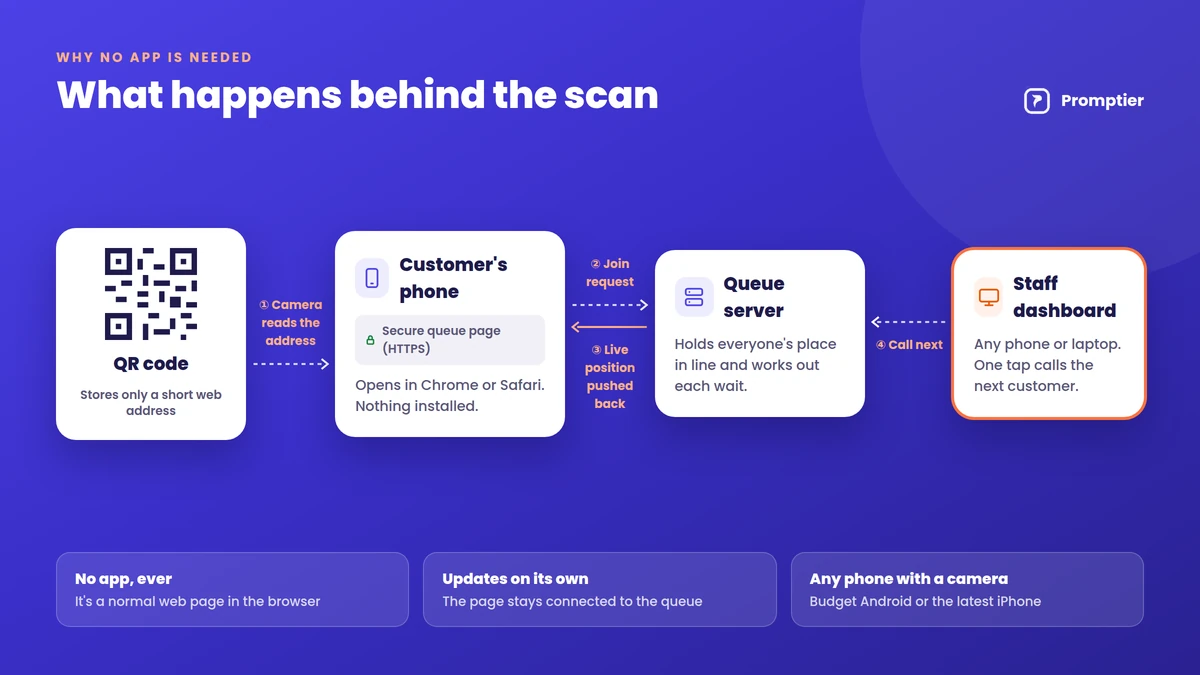
    Diagram of what happens behind a QR code queue scan: the camera reads a web address, the phone opens a secure queue page, the queue server pushes live position back, and staff call next from a dashboard
    1. The camera decodes the code and reads the web address stored in it.
    2. The browser opens the address, loading the business’s queue page for that location.
    3. The page registers the customer in the queue on the queue provider’s server and gives them a place.
    4. The page stays connected, so when staff call the next person, the new position is pushed to every waiting customer’s screen.
    5. A notification is triggered when the customer is near the front, depending on the system and the phone’s settings.

    Because all of this runs in the browser, it works the same on a ₹8,000 Android phone and the latest iPhone, as long as the phone has a camera and a data connection.

    Why “No App Needed” Matters

    The biggest reason QR queues work is that they ask almost nothing of the customer. A queue app has to be found, downloaded, installed, opened and signed into before anyone can join a line. Most people visiting a clinic or service centre once a month won’t do that. A QR code takes one scan.

    • No storage or data used for an app. This matters on budget phones with limited space.
    • No account or password. Customers join in seconds, even on their first visit.
    • It works for occasional visitors. Nobody installs an app for a place they visit twice a year.
    • Scanning is already a habit in India. UPI recorded 24.51 billion transactions in August 2026 (Business Standard, citing NPCI), and a large share of those start with a QR scan at a shop counter. Customers who pay by scanning already know how to join a queue by scanning.

    What the Customer Sees vs What Staff See
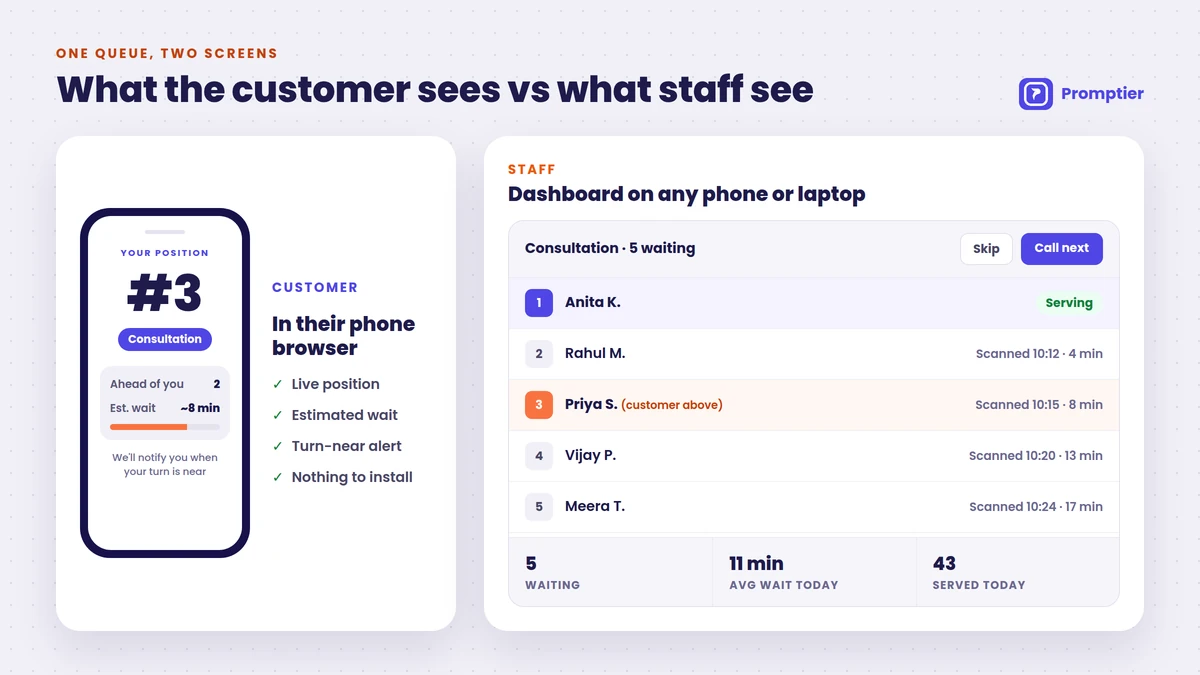
    Side-by-side view of a customer's phone showing queue position #3 and an 8-minute wait, and the staff dashboard listing waiting customers with Call next and Skip buttons
    Customer (phone browser)Staff (dashboard)
    JoiningScan QR, pick a service, tap to joinNew entries appear automatically
    During the waitLive position and estimated waitFull list of who’s waiting, per service
    Being calledNotification as their turn nearsOne tap to call next or skip
    AfterwardsNothing to uninstallTimestamped record, wait-time reports
    NeedsA phone with a camera and dataAny phone, tablet or laptop

    QR Code Queue vs Token Machine vs Queue App

    Token machineQueue appQR code queue
    How customers joinPress a button, take a paper slipDownload app, sign up, joinScan a QR code, join in the browser
    HardwareDispenser, printer, paper rollsNoneNone (a printed code)
    Customer sees live positionNo, just a numberYesYes
    Can wait away from the counterNoYesYes
    Works for first-time visitorsYesRarely (app download needed)Yes
    Wait-time dataUsually noneYesYes, every scan timestamped
    Typical setupVendor installationVariesSame day

    A token machine gives everyone a number but no visibility. A queue app gives visibility but loses most people at the download step. A QR code queue gives the visibility of an app with the ease of a token. If you’re comparing costs, see our token machine vs digital queue cost comparison.

    Where QR Code Queue Management Works Best

    It fits anywhere people arrive without a fixed slot and wait to be served:

    • Clinics and hospital OPDs: patients wait in the car or cafeteria instead of a crowded corridor. See hospital queue management.
    • Banks and NBFCs: separate QR queues for cash, loans and enquiries.
    • Salons and barbershops: walk-ins join from the door and come back when their chair is ready.
    • Service centres and government offices: long waits become manageable when people aren’t stuck in one room.
    • Restaurants and cafés: a waitlist for tables that guests can leave and come back to.

    How to Set Up a QR Code Queue

    Most businesses can go live the same day with a QR queue system like Promptier:
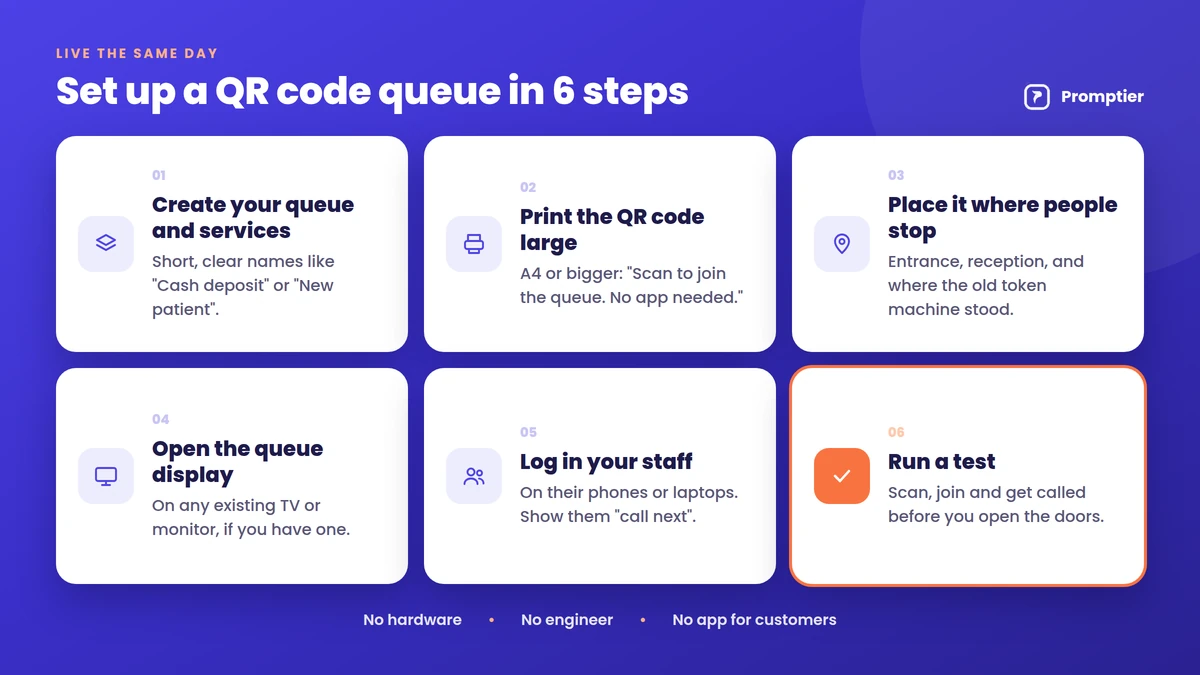
    Six steps to set up a QR code queue: create services, print the QR code, place it, open the queue display, log in staff and run a test
    1. Create your queue and services. Keep service names short and clear, like “Cash deposit” or “New patient”.
    2. Print the QR code large. A4 or bigger, with one line underneath: “Scan to join the queue. No app needed.”
    3. Place it where people stop, at the entrance, reception and wherever your old token machine stood.
    4. Open the queue display on an existing TV or monitor, if you have one.
    5. Log in your staff on their phones or laptops and show them “call next”.
    6. Run a test: scan, join and get called before you open the doors.

    For a bank branch walkthrough with timings, see how to replace your bank’s token machine with a digital system.

    Common Concerns, Answered

    “Some of my customers don’t have smartphones.”

    Keep a staffed desk or a tablet at reception where staff can add walk-ins to the same queue on the customer’s behalf. Everyone ends up in one line, however they joined.

    “What if the internet is slow?”

    The queue page is light and needs only a basic mobile data connection. For the business side, keep a simple fallback, such as a paper register, for outages.

    “Is it safe for customers to scan a QR code?”

    A QR code only opens a web address. Customers should check that the page belongs to your business before entering details. Use a branded, laminated code, and check it regularly so no one has stuck a fake code over it.

    “What data do customers share?”

    Usually just a name and sometimes a phone number, only what’s needed to call them. In India, that’s personal data under the DPDP Act, 2023, so show a short notice explaining how it’s used.

    “What if a customer’s phone battery dies?”

    They can tell the front desk their name or token number, and staff can find them in the dashboard.

    How Promptier Handles QR Queues

    Promptier is a QR code queue management system built for Indian businesses. It runs on the phones, laptops and screens you already have.

    • Scan and join in the browser. Customers point their camera at your QR code and join with a tap. No app store, no download, no sign-up wall.
    • Live position and estimated wait. The estimate updates in real time, and customers are notified as their turn approaches.
    • Staff dashboard on any device. Call next, skip, and see who’s waiting at a glance.
    • Queue display on any TV. Show the queue on an existing smart TV or monitor.
    • Timestamped data. Every scan is logged automatically, with average waits and peak hours.
    • Pricing. Free to start. The Pro plan is ₹499 per month per location. No hardware to buy.

    See how Promptier’s QR queue system works

    Frequently Asked Questions

    What is QR code queue management?

    QR code queue management is a way of running a waiting line where customers join by scanning a QR code with their phone. The queue opens in their browser, shows their live position and estimated wait, and notifies them when their turn is near. It replaces paper tokens and physical lines.

    Do customers need to download an app to join a QR code queue?

    No. The QR code opens a web page in the phone’s browser, such as Chrome or Safari. Customers join there with a tap. There’s nothing to download, install or sign up for.

    How does a customer know when it’s their turn?

    The queue page shows their live position and estimated wait, updating each time staff call someone. As their turn approaches, they get a notification on their phone, and the lobby TV, if used, shows who’s being served.

    Does a QR code queue work on all phones?

    It works on any smartphone with a camera and a data connection. Built-in camera apps on iPhones and most Android phones read QR codes directly, and Google Lens or a UPI app’s scanner works too.

    What if a customer doesn’t have a smartphone?

    Staff can add them to the same queue from the front desk or a reception tablet. They wait in the same line as everyone else and are called by name or token number.

    How much does a QR code queue management system cost?

    It’s much cheaper than hardware. Promptier is free to start, and its Pro plan costs ₹499 per month per location. There’s no dispenser, kiosk or paper to buy, because the only physical item is a printed QR code.

    How long does it take to set up?

    Most businesses go live the same day. You create your services, print the QR code, open the dashboard on an existing phone or laptop and run a test scan.

    Conclusion

    QR code queue management works because it removes every step customers resist. There’s no app to download, no account to create and no line to stand in: just a scan, a browser page and a live position that updates on its own. Businesses get a calmer waiting area and real wait-time data, and all they have to install is a printed code.

    Ready to try it? See how the Promptier QR queue system works and book a free demo, or explore Promptier for hospitals, banks and service businesses. No credit card, no hardware, support in IST hours.

    Related reading
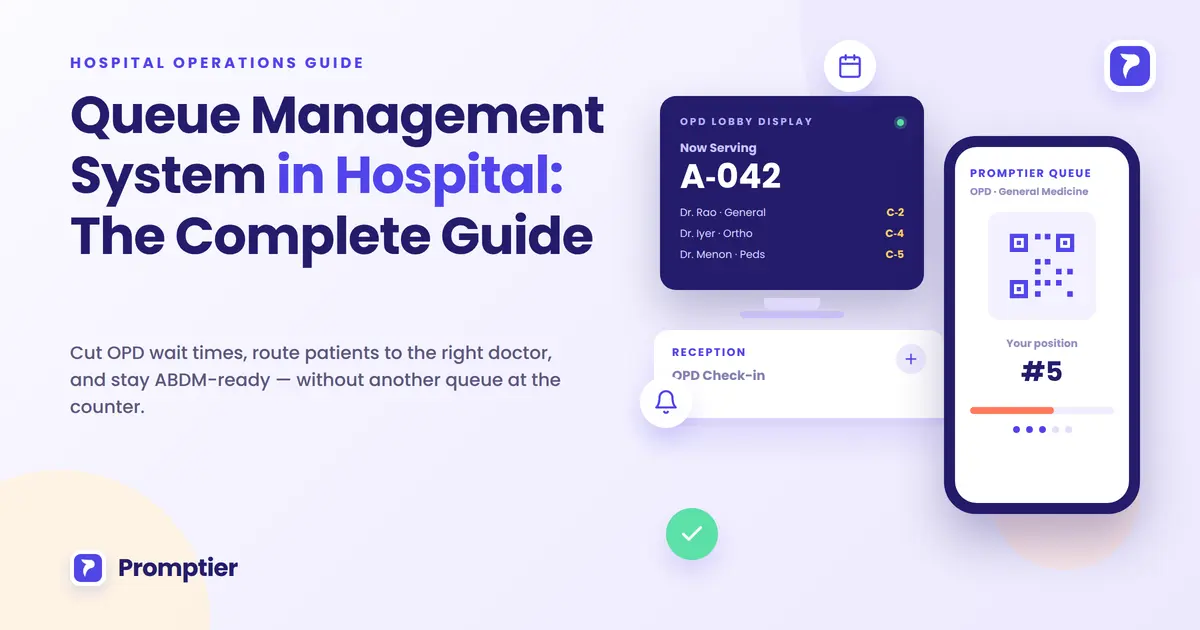
  • Queue Management System in Hospital: The Complete Guide

    Queue Management System in Hospital: The Complete Guide

    A queue management system in hospital OPDs does one job a paper token can’t: it moves each patient through registration, the right doctor’s OPD, pharmacy, lab and billing without a separate crowded line at every step.

    Ask any hospital administrator in India what happens between a patient walking in and seeing a doctor, and “queue” undersells it. There’s a registration line, a doctor-wise OPD queue, a pharmacy queue, a lab queue and a billing queue. That’s four or five separate waits stitched into one visit, and most are still run on paper tokens or a register.

    This guide covers what a hospital queue system needs to do, how it works stage by stage, what to look for when buying one, and how the check-in step now connects to ABDM and the DPDP Act.

    A queue management system in hospital OPDs is software that lets patients check in by QR code, kiosk or appointment, puts them in the right queue for their doctor or department, shows their live position and expected wait on their phone, alerts them when their turn is near, and logs every step with a timestamp. It replaces paper tokens and one blended OPD line.

    Key Takeaways

    • A hospital visit is several linked queues: registration, doctor-wise OPD, pharmacy, lab and billing. A hospital queue system has to route patients across all of them, not manage one line.
    • The biggest wait-time win is usually routing, not faster doctors. A 5-minute pharmacy pickup shouldn’t wait behind a 20-minute consultation.
    • In a study of 30 hospitals in Nellore, Andhra Pradesh, average OPD waits ranged from 15.5 minutes in private hospitals to 39.71 minutes in voluntary-sector hospitals, and men’s median wait was 19% lower than women’s.
    • Check-in is where a patient’s ABHA ID is captured or verified. ABDM’s Digital Health Incentive Scheme (DHIS) pays facilities for ABHA-linked records, but its rates change often, so check the current terms.
    • A patient’s name, phone number and visit time are personal data under the DPDP Act, 2023. The DPDP Rules, notified on 14 November 2025, phase in compliance over 18 months.

    What Is a Queue Management System in a Hospital?

    A queue management system in hospital settings is software that lets patients check in digitally (by QR code, kiosk or pre-booked appointment), routes them into the correct queue (a specific doctor’s OPD, pharmacy, lab or billing), tracks the live wait, and logs each stage of the visit for records and reporting.

    A retail or bank queue manages one kind of wait. A hospital visit is a chain of them. A patient might register, wait for a specific doctor, walk to the pharmacy, wait again, then queue at billing. A single “take a token” system can’t represent that. A hospital queue system needs doctor-wise and department-wise routing from the start, so a patient’s place in the pharmacy queue depends on when they reach the pharmacy, not when they arrived at the hospital.

    The other thing specific to healthcare is the record. Every check-in captures at least a name and phone number, and increasingly a link to the patient’s ABHA health ID. That record needs to be accurate, timestamped and collected with proper notice.

    Key terms used in this guide:

    • Doctor-wise and department-wise routing: automatically placing a patient in the correct sub-queue (a specific doctor’s OPD, pharmacy, lab or billing) instead of one blended line.
    • ABHA ID: the Ayushman Bharat Health Account, a 14-digit health ID under the Ayushman Bharat Digital Mission (ABDM) that links a patient’s records across providers.
    • DHIS: the Digital Health Incentive Scheme under ABDM, which pays health facilities for KYC-verified, ABHA-linked digital health records above a monthly baseline.
    • Personal data (DPDP Act, 2023): any data about an individual who can be identified by it. A patient’s name, phone number and visit timestamp all qualify.

    Where Hospital Queue Management Fits in the Patient Journey

    Queue management spans four stages of a hospital visit, not just the wait at one counter. A system that only covers one stage solves a smaller problem than it appears to.

    • Pre-arrival: online appointment booking, visit instructions and, where the hospital participates in ABDM, advance ABHA linkage. A patient who arrives already registered has a much faster check-in.
    • Arrival: check-in by QR code, kiosk or front desk. This is where consent for data use is captured and where the patient gets a realistic wait estimate instead of silence.
    • Service: doctor-wise OPD, pharmacy, lab and billing. Routing, live wait visibility and staff call-up matter most here.
    • Post-visit: billing, prescription pickup and follow-up booking. This is also where the visit’s data (wait times, no-shows, service durations) becomes something the hospital can analyse instead of losing to a paper register.

    Why This Matters for Hospitals in India Right Now

    Three things are converging on hospital front desks in 2026: evidence that OPD waits are long and unevenly spread, ABDM incentives tied to how patients are registered, and legal duties under the DPDP Act for the data collected at check-in.

    The evidence on waiting times. A study of 830 patients at 30 randomly selected hospitals in Nellore, Andhra Pradesh, found average OPD waits of 20.3 minutes in government hospitals, 15.5 minutes in private hospitals and 39.71 minutes in voluntary-sector hospitals (Sriram and Noochpoung, IJCMPH, 2018). After adjusting for other factors, men’s median wait was 19% lower than women’s. Patients arriving by ambulance waited 64% less than others, except in public hospitals. The data is from one district in 2012, but the pattern is the point: none of it shows up on a paper token system. It only becomes visible once check-in and wait times are logged.

    ABDM and DHIS. Hospitals are being encouraged to create ABHA-linked patient records. Under DHIS, facilities earn incentives for KYC-verified, ABHA-linked records above a baseline of 100 a month. Under Corrigendum 7 (April to September 2026), that’s about ₹5 per OP consultation or prescription record and ₹10 per discharge summary or diagnostic report (ClaimsLens summary). The scheme has been revised seven times since January 2023, so check the official DHIS page before building projections. Because check-in is where a patient’s ABHA ID is captured or verified, the queue and ABHA linkage should be designed together.

    The DPDP Act. A patient’s name and phone number collected to run a queue are personal data, and the hospital is a data fiduciary with notice and consent duties. The DPDP Rules were notified on 14 November 2025, with an 18-month phased compliance period (PIB). This is general information, not legal advice. Have your compliance or legal team review how patient data is captured and used.

    Key Benefits of a Hospital Queue Management System

    A queue management system in hospital OPDs shortens the time patients spend standing in corridors, gives staff a timestamped record of every visit, and turns check-in into a clean moment for consent and ABHA linkage.

    • Shorter, more predictable waits. Routing a 5-minute pharmacy pickup away from a 20-minute consultation queue means the pharmacy patient doesn’t inherit someone else’s wait. It’s a structural fix, not a “hire more staff” fix.
    • A record of patient flow. Every check-in, transfer and completion is timestamped, so “how long did this patient wait for Dr. X?” has a real answer.
    • One check-in for queue, consent and ABHA. Digital check-in can show patients what data is collected and why, log their consent, and prompt for their ABHA ID where your systems support it.
    • Visibility into access gaps. If some patient groups wait longer, logged data is the only way to see it and fix it.
    • Calmer waiting areas. Patients who can wait in the cafeteria or parking area instead of a packed OPD corridor are more comfortable and easier to manage.
    • Department-level reporting and less front-desk pressure. Administrators see OPD, pharmacy, lab and billing waits separately instead of one blended average, and staff field fewer “how much longer?” questions.
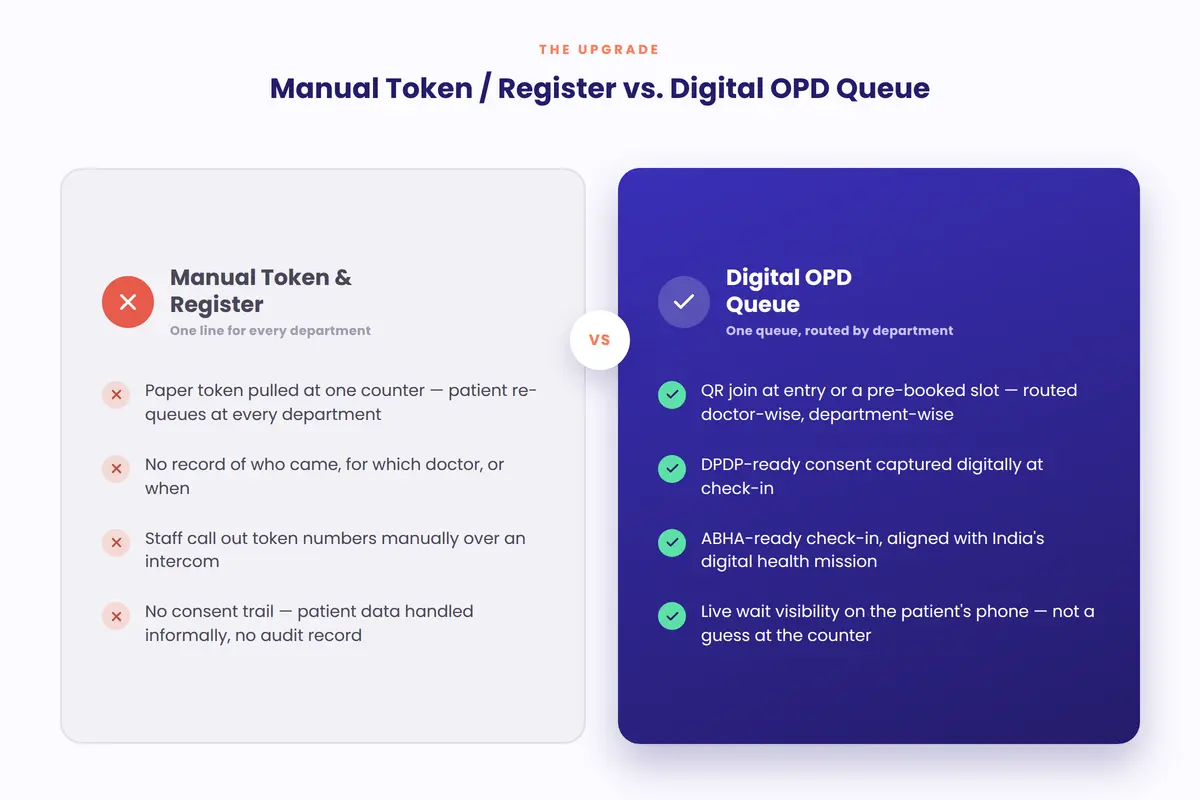
    Comparison of manual hospital token counters versus digital OPD queue management
    DimensionManual Token / RegisterDigital Hospital Queue
    Department routingOne line per counter, manually managedOPD/pharmacy/lab/billing routed automatically
    Wait-time visibilityAnecdotal, department by departmentLogged and comparable across departments
    ABHA linkageA separate administrative step, if done at allCaptured at the same check-in moment
    Consent for patient dataNot collectedCaptured at check-in, logged
    Equity visibilityInvisibleMeasurable (e.g., wait time by patient group)
    ROI evidenceAnecdotal or unsourced vendor claimsGrounded in independently published research

    How a Hospital Queue Management System Works

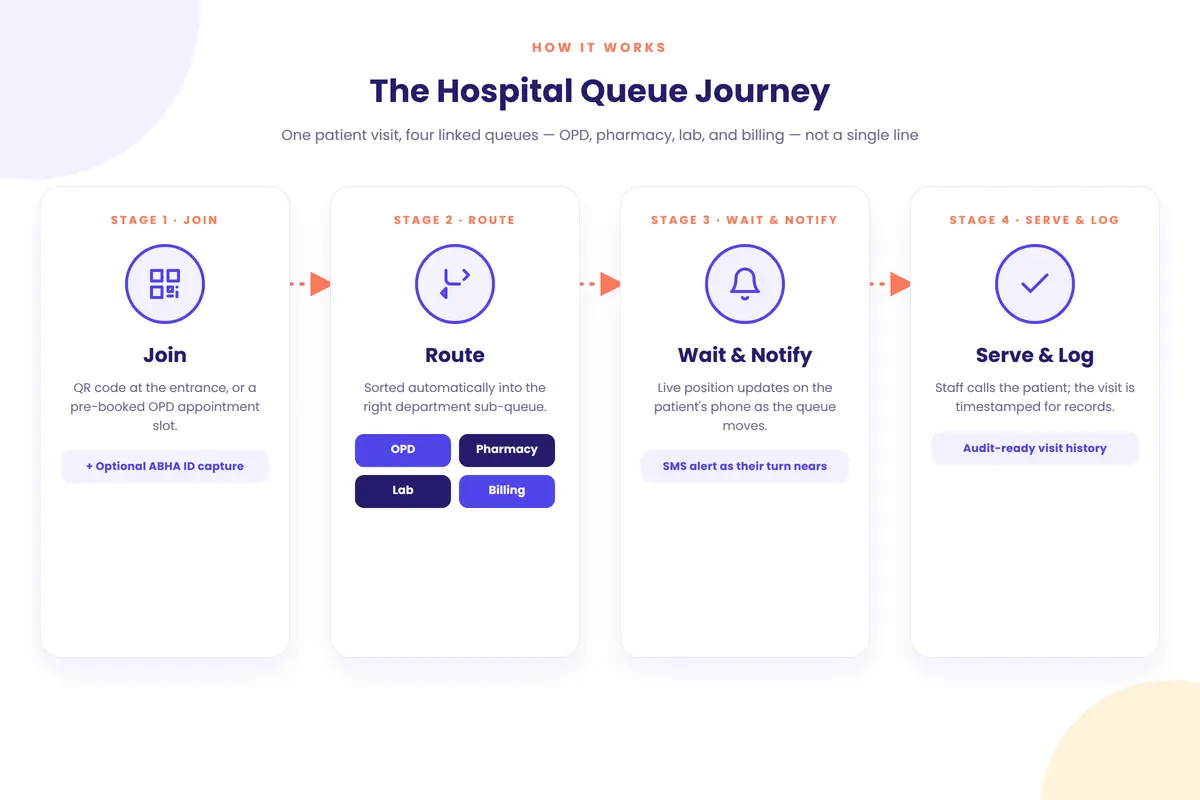
    A hospital queue system runs a four-stage flow: the patient checks in, the system routes them to the right queue, they wait with a live position and a phone alert, and each stage is logged when it’s completed.

    Workflow diagram of a hospital queue from patient check-in through department routing to service completion

    Stage 1: Join

    A walk-in patient scans a QR code, checks in at a kiosk or is registered at the front desk. A patient with a booked appointment checks in the same way. They see a clear consent notice and, where the hospital participates in ABDM, are prompted to link or verify their ABHA ID. The output is a token with a queue position, an estimated wait and a logged consent record.

    Stage 2: Route

    The patient picks, or staff assign, the reason for the visit: a specific doctor’s OPD, pharmacy, lab or billing. The system places them in that sub-queue instead of one blended line. In Promptier, for example, each doctor or department is set up as its own queue (see how hospital queue management works).

    Stage 3: Wait and Notify

    The patient’s position and estimated wait update live on their phone. As their turn nears, they get a phone notification (a browser alert, SMS or WhatsApp message, depending on the system), so they don’t need to stand by the door.

    Stage 4: Serve and Log

    Staff or the doctor call the next token, the patient is served, and the system logs the timeline: check-in time, department, wait duration and completion time. That record feeds the hospital’s dashboard and, where relevant, ABDM reporting.

    StageCadenceOwnerTypical Tooling
    JoinContinuousPatient (self-service) or front deskQR code, kiosk, booking link, consent notice
    RouteAutomatedSystemDoctor/department sub-queues
    Wait & NotifyContinuousSystemLive position, SMS alert
    Serve & LogPer visitStaff/doctorCounter or room call-up, timestamped record

    Best Practices for Hospital Queue Management

    The single most useful practice is routing by doctor and department before optimising anything else. Most long OPD waits come from blended queues, not slow individual service.

    • Route by doctor, not just by department. One OPD line for every doctor in a specialty hides who is running late. A sub-queue per doctor gives each patient a realistic wait for the doctor they’re actually seeing.
    • Separate quick transactions from long ones. Pharmacy, lab and billing each get their own queue, so a 5-minute pickup doesn’t wait behind a 20-minute consultation.
    • Capture ABHA at check-in, not as an afterthought. Offer ABHA linkage in the same flow as joining the queue, rather than at a separate desk patients skip.
    • Make consent part of check-in. Show a clear notice and log the patient’s consent, instead of collecting a phone number with no record.
    • Track wait time by patient group. One overall average hides gaps. Check whether women, elderly patients or walk-ins wait longer, and find out why.
    SituationWhat to doExpected result
    One OPD line for several doctorsGive each doctor a sub-queuePatients see a realistic, doctor-specific wait
    Pharmacy and billing stuck behind consultationsGive each department its own queueTotal visit time drops without adding staff
    ABHA linkage at a separate deskOffer it at queue check-inHigher linkage rate, less patient friction
    No view of wait time by patient groupTrack and review it weeklyAccess gaps become visible and fixable

    Common Challenges and How to Solve Them

    The most common mistake is digitising the main registration desk and stopping there. Registration gets faster, but pharmacy, lab and billing stay on paper, so the patient’s total visit barely gets shorter and the project gets blamed.

    Only registration gets digitised

    Plan department coverage from day one, even if the rollout is phased. Commit to a date for pharmacy, lab and billing rather than leaving them “for later”.

    Elderly or less digitally comfortable patients struggle with QR check-in

    Keep a staffed front desk or kiosk that can issue a token on the patient’s behalf. Digital-first doesn’t have to mean digital-only.

    ABHA linkage feels like extra work at a busy desk

    Build it into the same check-in flow as joining the queue, so it’s one prompt, not a separate errand.

    Consent text copied from a generic template

    A generic “I agree” box may not meet the DPDP Act’s standard of free, specific, informed and unambiguous consent. Have your compliance or legal team review the actual notice patients see.

    Doctors resist visible wait-time data

    Frame the data around patient flow and staffing, not individual doctor speed, and involve clinical leadership in how it’s used before rolling it out hospital-wide.

    No plan for downtime

    If the internet or system goes down on a busy OPD morning, you need a fallback. Keep a paper token or register process ready, and ask any vendor what happens during an outage.

    Real-World Scenarios

    These are illustrative scenarios based on common patterns in Indian hospital OPDs, not case studies of named institutions.

    Government hospital OPD, high daily volume. A government OPD on paper tokens had no way to see that its waits were concentrated in two specialties during morning hours. With doctor-wise digital queues, administrators could see the real bottleneck and adjust which doctors covered the peak, instead of assuming the whole OPD needed more staff.

    Private multi-specialty hospital, ABDM rollout. ABHA linkage was low because front-desk staff treated it as a separate, optional step during busy mornings. Folding ABHA capture into queue check-in raised linkage without adding a counter or a new step for patients.

    Diagnostic and lab department. The lab shared a waiting area and a queue with OPD consultations, so a 10-minute blood draw regularly waited behind a 25-minute follow-up. Giving the lab its own queue cut lab waits without changing consultation schedules at all.

    Real-World Scenarios

    These are illustrative scenarios based on common patterns across hospital OPD operations in India, not case studies of named institutions.

    Government hospital OPD, high daily volume. A government hospital OPD running purely on paper tokens had no way to see that its average wait, closer to the 20-minute range typical of public facilities, was concentrated in two specialties during morning hours. After introducing doctor-wise digital queuing, administrators could see the actual bottleneck by specialty and adjust which doctors saw patients during the peak window, rather than assuming the whole OPD needed more staff.

    Private multi-specialty hospital, ABDM rollout. A private hospital participating in ABDM found ABHA linkage rates were low because front-desk staff treated it as a separate, optional step during a busy morning. Folding ABHA capture into the same QR check-in flow as queue joining lifted linkage rates without adding a new counter or a new step for patients.

    Diagnostic and lab department. A hospital’s lab department shared a waiting area with OPD consultation patients, so a 10-minute blood draw regularly waited behind a 25-minute consultation follow-up. Giving the lab its own queue, separate from OPD consultations, shortened lab wait times without touching consultation scheduling at all.

    8 Features to Look for in a Hospital Queue Management System

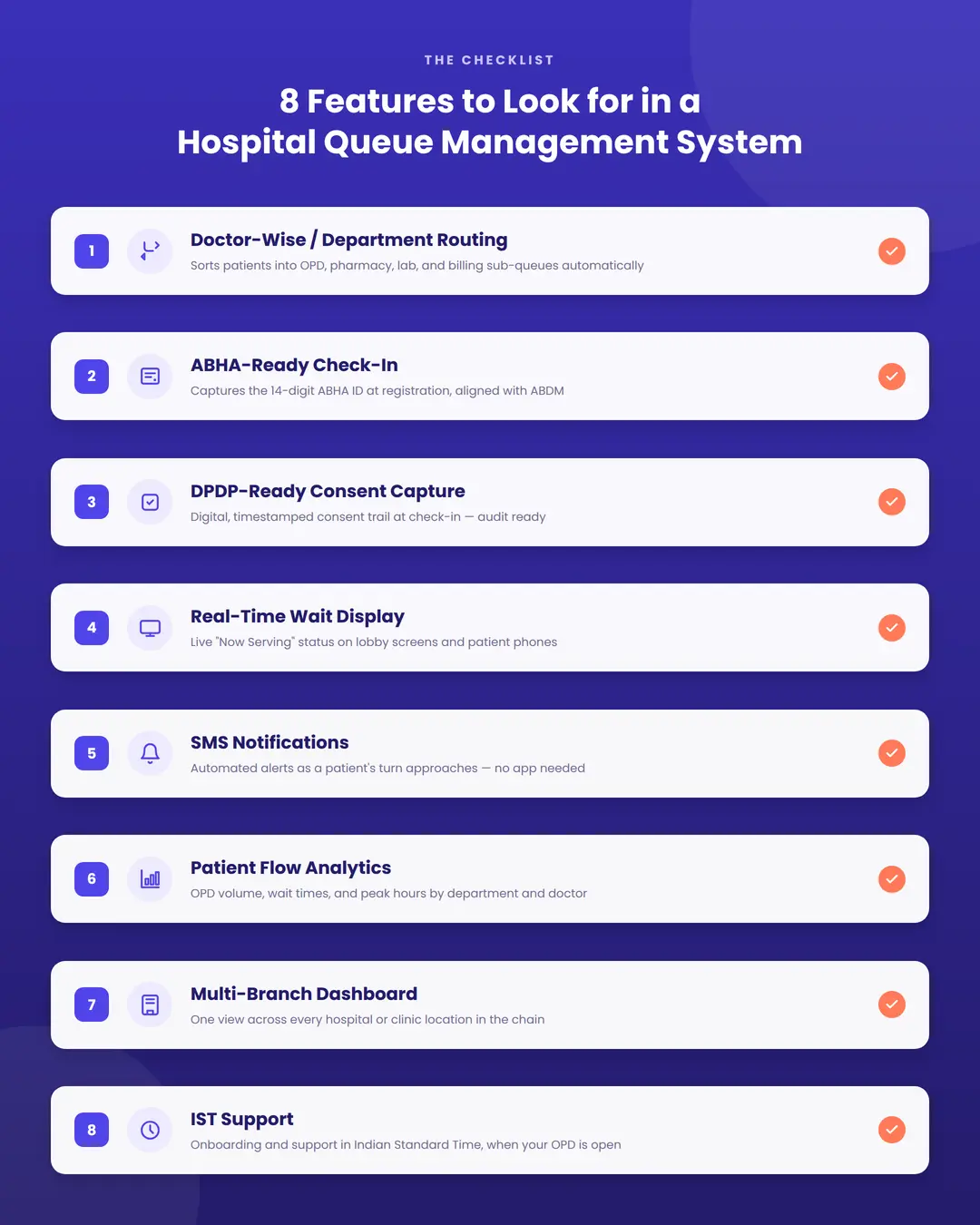
    When you evaluate a queue management system in hospital OPDs, doctor-wise routing and proper consent capture matter most, because a generic retail queue tool is least likely to handle them well for a hospital.

    Infographic checklist of 8 features to look for in a hospital queue management system
    FeatureWhat it doesWhy it mattersLook for
    Doctor and department routingSorts patients into the right sub-queueQuick visits don’t wait behind long onesSeparate queues per doctor or department
    Walk-ins and appointments togetherMerges booked and walk-in patientsOne true order for each doctorBoth visible in one dashboard
    ABHA-ready check-inCaptures or verifies ABHA ID at check-inSupports ABDM and DHISInline prompt or HIS integration
    Consent captureShows and logs a data noticeDPDP Act complianceA visible, logged consent step
    Live wait displayShows the token being served per departmentLowers how long a wait feelsWorks on existing TVs
    Phone notificationsAlerts patients as their turn nearsFrees patients from crowded corridorsBrowser, SMS or WhatsApp alerts; timing per department
    Patient flow analyticsReports waits, volume and no-showsTurns complaints into dataDepartment and doctor-level detail, exportable
    IST support and multi-branch viewSame-timezone help; one view across sitesFast fixes during OPD peaks; comparison across branchesA stated support window and role-based access

    How Promptier Works for Hospitals and Clinics

    Promptier is a QR-based queue management system in hospital OPDs and clinics that runs on the phones, laptops and screens you already have. There’s no hardware to buy, and most clinics go live the same day.

    • QR check-in with no app. Patients scan a QR code and join the queue in their phone browser.
    • Walk-ins and appointments in one dashboard. Booked and walk-in patients sit in one view, so each doctor’s queue is in the right order.
    • Separate queues by doctor or department. Set up OPD, pharmacy, lab and billing as their own queues.
    • Live position and estimated wait. Patients see where they stand and are notified on their phone as their turn approaches.
    • Lobby TV display. Open a URL on any smart TV or monitor to show the token being served.
    • Timestamped records. Every entry is logged, and wait-time data can be exported for audits and reviews.
    • Pricing. Free to start. Pro is ₹499 per month per location. Enterprise pricing for hospital groups is custom.

    If you need ABHA capture or integration with your hospital information system (HIS), ask about it in your demo, as these aren’t listed on the product page yet.

    See how Promptier’s hospital queue management system works

    Future Trends

    • ABDM integration becoming expected. As ABDM adoption grows, hospitals that already fold ABHA linkage into check-in will be ahead of those treating it as a separate project.
    • Clearer DPDP guidance for patient data. As the 18-month DPDP Rules rollout continues, expect clearer standards on consent and notice for healthcare data.
    • Wait prediction from visit history. With enough logged visits, systems can forecast OPD waits by doctor and time of day, which helps both patient messaging and staffing.

    Frequently Asked Questions

    What is a queue management system in a hospital?

    A queue management system in hospital OPDs is software that lets patients check in by QR code, kiosk or appointment and places them in the right queue: a specific doctor’s OPD, pharmacy, lab or billing. It shows their live position and wait, alerts them when their turn is near, and logs each stage of the visit instead of relying on paper tokens.

    How long do patients wait in Indian hospital OPDs?

    It varies widely. One study of 30 hospitals in Nellore, Andhra Pradesh, found average OPD waits of 20.3 minutes in government hospitals, 15.5 minutes in private hospitals and 39.71 minutes in voluntary-sector hospitals, with women waiting longer than men. Waits in large city hospitals can be much longer, which is why hospitals need their own logged data.

    How much does a hospital queue management system cost in India?

    Costs range from free starter plans to custom enterprise contracts. Promptier is free to start, its Pro plan costs ₹499 per month per location, and hospital groups get custom Enterprise pricing. Hardware-based token systems cost more upfront because they need dispensers, displays and servicing.

    Is patient data collected by a hospital queue system covered by the DPDP Act?

    Yes. A patient’s name, phone number and visit timestamp are personal data under the DPDP Act, 2023. The hospital collecting them is a data fiduciary with notice and consent duties. The DPDP Rules were notified on 14 November 2025 with an 18-month phased rollout. This is general information, not legal advice.

    Can a queue system help with ABDM and ABHA linkage?

    Yes, if it’s designed to. A queue system can prompt for or verify a patient’s ABHA ID at the same moment they check in. ABHA-linked records can count towards ABDM’s Digital Health Incentive Scheme, but the scheme is run by the National Health Authority and its rates change often, so check the current terms.

    Does a queue management system replace the registration desk?

    No. Most hospitals keep a staffed registration desk or kiosk alongside QR check-in, both for patients who can’t or don’t want to use a phone and as a fallback if the system or internet is down.

    How is a hospital queue system different from a bank or retail queue system?

    A hospital visit chains several queues together: registration, doctor-wise OPD, pharmacy, lab and billing. A hospital queue system needs routing by doctor and department, handling of walk-ins alongside appointments, and more careful handling of patient data than a typical retail queue.

    What is the biggest mistake hospitals make with queue management software?

    Digitising only the front desk. Registration gets faster, but pharmacy, lab and billing stay on paper, so the bottleneck simply moves and the patient’s total visit time barely changes.

    Conclusion

    A queue management system in hospital OPDs has to do more than replace a paper token. It has to route patients across a chain of departments, make a measurable dent in waits that research shows are long and uneven, and treat check-in as what it now is: the moment for consent and, where ABDM applies, ABHA linkage.

    A faster front desk feels like progress. But if pharmacy, lab and billing stay on paper, the patient’s visit barely gets shorter. The hospitals getting real results treat this as a whole-journey project, not a registration-desk upgrade.

    When you compare options, look closely at doctor-wise routing, how consent and ABHA are handled at check-in, and whether the reporting shows you wait-time gaps you didn’t know about.

    See it work in your OPD. Explore Promptier’s hospital queue management system and book a free demo. No app for patients, no new hardware, support in IST hours.

    Related reading