Short answer: The main Qwaiting alternatives are Promptier, Qminder, Waitwhile, Skiplino, Qmatic, QLess and Wavetec. Qwaiting’s plans start at $249 a month. If you want a free plan or rupee pricing, look at Promptier and Waitwhile. If you need kiosks, ticket dispensers or on-premises servers, look at Qmatic and Wavetec.
Qwaiting is a capable queue management system, and for some businesses it’s the right choice. But its paid plans are priced in US dollars, it offers a trial rather than a free plan, and it is built for large, multi-branch operations. If you run a clinic, a service centre or a single-branch business in India, it’s worth checking what else is out there before you commit.
We’ve kept this comparison honest in one simple way. Every fact about Qwaiting below comes from qwaiting.com, and every fact about each alternative comes from that company’s own website. All of them were checked on 22 October 2026. Prices change, so follow the source links before you buy.
What Qwaiting offers
Qwaiting describes itself as a cloud-based queue management system. It replaces physical lines and paper tokens with appointment and walk-in queues. Here is what its own website says.
Pricing : four plans, all in US dollars. Each one is limited by the number of staff logins.
| Qwaiting plan | Monthly | Yearly | Staff logins |
| Starter | $249 | $2,490 | Up to 5 |
| Business | $349 | $3,490 | Up to 10 |
| Enterprise | $399 | $3,990 | Up to 20 |
| Custom | $649 | $6,490 | Up to 50 |
- Trial: every plan includes a 14-day free trial with no credit card. There is no free plan.
- Yearly billing: two months free.
- Plan features: analytics and reporting start on Business. API access and a dedicated account manager start on Enterprise. Audit logging and data location control are on Custom.
- Products: cloud and on-premises software, self-service kiosks, digital signage, face recognition and people counting.
- Customer alerts: the home page lists SMS and WhatsApp alerts.
- Languages: the site is available in English, Arabic, French and Spanish.
- Scale: Qwaiting says it serves 10,000+ businesses in 30+ countries.
- Hardware prices: kiosks, TV displays and ticket printers are mentioned, but no hardware prices are published.
Where Qwaiting fits well: large, multi-branch organisations that want kiosks, on-premises hosting, biometric queues or Arabic-language support, and that are comfortable paying in US dollars.
Where people look for alternatives: a free plan, rupee pricing, a simpler browser-only setup for a single location, or a budget below $249 a month.
See the full Promptier vs Qwaiting comparison.
Qwaiting alternatives at a glance
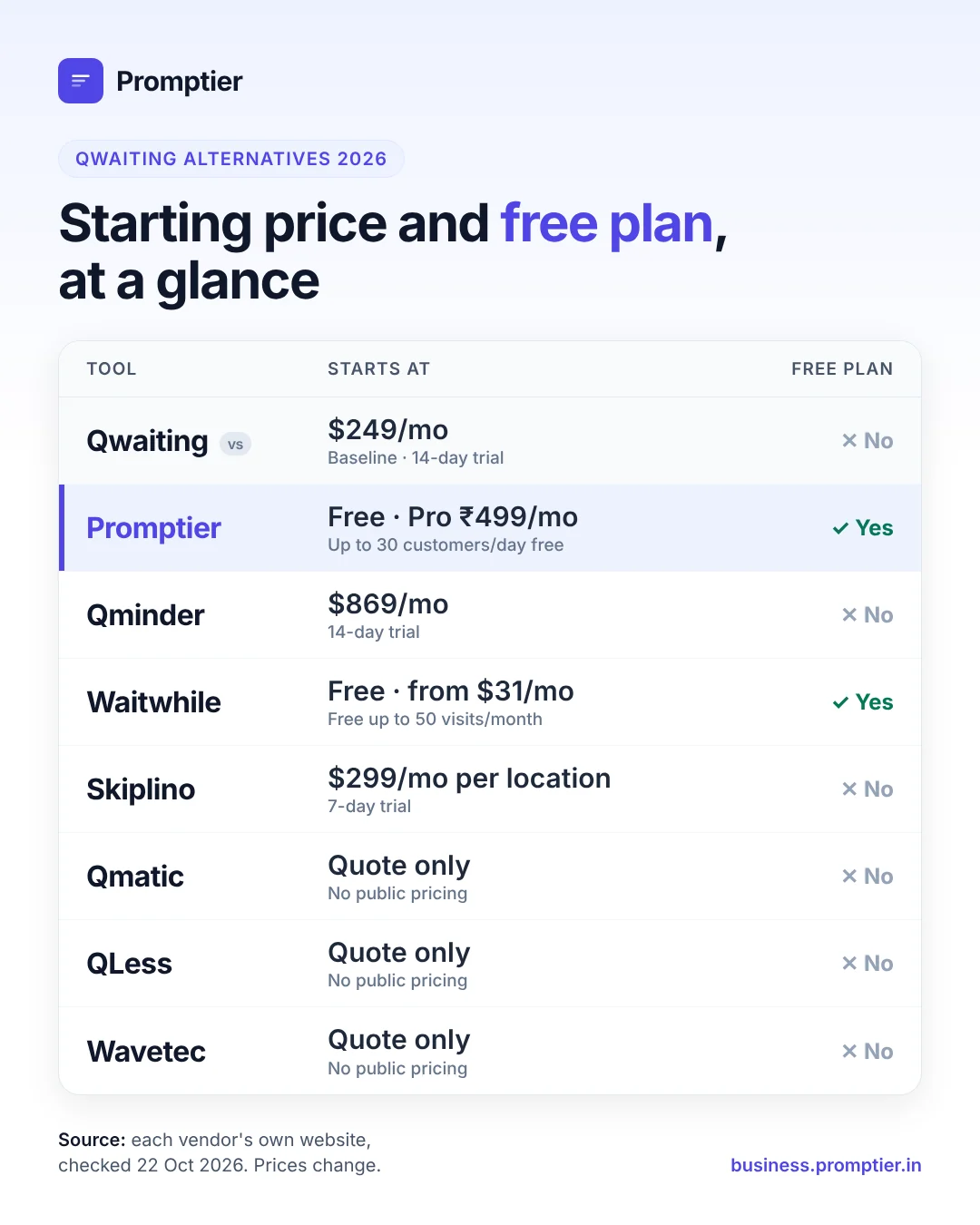
The table compares Qwaiting with seven alternatives on the points that come up first when you shortlist. Each figure comes from the vendor’s own pricing or home page, checked on 22 Oct 2026.
| Tool | Starting price (vendor’s site) | Free plan | Free trial | Setup and hardware | Best for |
| Qwaiting (baseline) | $249/month (Starter, 5 staff logins) | No | 14 days, no card | Cloud or on-premises; optional kiosks and signage | Large multi-branch, kiosk-led setups |
| Promptier | Free; Pro ₹499/month per location | Yes, up to 30 customers a day | 14 days on Pro, no card | Browser only, QR entry, no customer app; uses existing phones and TVs | Indian clinics, service centres and SMBs |
| Qminder | $869/month (Business, 25 users) | No | 14 days | iPad kiosk and Apple TV display, bought separately | US, UK and Canada teams wanting polished check-in |
| Waitwhile | Free; Starter from $31/month | Yes, 1 location, 50 visits a month | Not stated | Web waitlist and bookings, kiosk and TV display | Very small or low-volume waitlists |
| Skiplino | $299/month per location (Professional, billed yearly) | No | 7 days, no card | Customer iOS and Android apps | Businesses happy for customers to use an app |
| Qmatic | Quote only | No | Not stated | Cloud or on-premises (Orchestra); certified hardware | Large enterprise and government networks |
| QLess | Quote only | No | Not stated (self-guided demo) | Walk-ins, appointments, virtual visits and callbacks | DMVs, government, healthcare, universities |
| Wavetec | Quote only | No | Not stated | Ticket dispensers, self-service kiosks, digital signage | Banks and branches wanting full hardware |
Prices are as shown on each vendor’s site. Most are in US dollars; Promptier is in Indian rupees. Check the source links before you buy, because prices change.
The 7 best Qwaiting alternatives, one by one
1. Promptier: the free, rupee-priced Qwaiting alternative for India
Promptier is a browser-based queue management system built in India by Ionaught Technologies. Customers scan a QR code and join the queue from their phone’s browser. Staff call the next person from a live dashboard. There is no app to install and no hardware to buy.
- Price: free for up to 30 customers a day. Pro is ₹499 a month per location (launch offer), with a 14-day trial and no credit card. Enterprise pricing is custom.
- Pro includes: up to 3 staff, unlimited queue users and services, and 1,000 bookings a month.
- Features: QR and link entry, walk-ins and appointments in one list, TV display on any existing screen, push notifications, and timestamped wait-time data.
- Support: Monday to Saturday, 9 AM to 6 PM IST, with GST-compliant invoices.
- Choose it over Qwaiting if: you want a free plan, rupee pricing and a same-day setup on the devices you already own.
- Choose Qwaiting instead if: you need SMS or WhatsApp alerts, kiosks, on-premises hosting or Arabic-language support. Promptier notifies customers by browser push notification.
Comparing the two directly? See Promptier vs Qwaiting, side by side: pricing for one location, features and which to choose.
2. Qminder: a polished check-in experience, at a higher price
Qminder is a cloud queue management system with check-in kiosk and TV apps.
- Price(qminder.com/pricing): Business is $869 a month or $9,468 a year with 25 users. Premium is $1,149 a month or $12,588 a year with 50 users. Enterprise is custom.
- Trial: 14 days with all features. No free plan.
- Hardware: the kiosk runs on an iPad and the display on an Apple TV. Both are bought separately.
- SMS: included in the US, UK and Canada. Other regions may cost extra.
- Good fit: teams in North America or the UK that want a premium, Apple-based check-in setup.
3. Waitwhile: a free plan for small waitlists
Waitwhile handles waitlists and bookings, with a kiosk and TV display.
- Price(waitwhile.com/pricing): Free plan for 1 location and up to 50 visits a month. Starter is from $31 a month, and Business is from $55 a month. Enterprise is a custom quote. Annual billing saves 20%.
- Note: paid tiers are priced by number of locations or total visits. On the Free plan, once you pass 50 visits in a month you can’t add new guests until the next cycle or until you upgrade.
- Good fit: very low-volume businesses, or anyone testing a digital waitlist before paying.
4. Skiplino: app-based queuing and appointments
Skiplino sells queue management, appointments, a virtual branch and a retail product.
- Price (skiplino.com/pricing): queue management Professional is $299 a month per location and Enterprise is $399, both billed yearly. Appointments start at $99 a month per location.
- Trial: 7 days, no credit card. No free plan. Setup is free.
- How customers join: through Skiplino’s iOS and Android apps.
- Good fit: businesses that are comfortable asking customers to download an app.
5. Qmatic: enterprise customer-journey platform
Qmatic is headquartered in Mölndal, Sweden. It says it handles over two billion customer journeys a year across more than 65,000 systems.
- Price: not published. You request a demo or talk to sales.
- Deployment: cloud (Qmatic Cloud) or on-premises (Qmatic Orchestra), with Qmatic-certified hardware and digital signage.
- Good fit: large networks with many branches, such as city governments, telecoms and universities.
6. QLess: queues, appointments and callbacks for public services
QLess combines walk-ins, appointments, virtual visits and callbacks on one platform.
- Price: not published. You request a demo.
- Industries named on its site: DMVs and state agencies, government, healthcare and higher education.
- Good fit: public-sector offices with heavy, regulated footfall.
7. Wavetec: hardware-led branch transformation
Wavetec sells queue management alongside physical hardware.
- Price: not published. Its site offers an ROI calculator and a demo request.
- Hardware: ticket dispensers, self-service kiosks (cash deposit, card issuance, SIM dispensing) and digital signage.
- Good fit: banks and telecom branches that want dispensers and kiosks as part of the project.
Which Qwaiting alternative should you choose?
Start with how your customers arrive and what you can spend each month. Then match yourself to one of these:
- Best Qwaiting alternative for Indian SMBs, clinics and service centres: Promptier. It has a free plan, rupee pricing, GST invoices and no hardware. See clinic queue management or service centre queue management.
- Best free option for a tiny waitlist: Waitwhile’s free plan, if you stay under 50 visits a month.
- Best for a premium check-in in the US, UK or Canada: Qminder.
- Best if your customers will use an app: Skiplino.
- Best for large enterprise or government networks: Qmatic or QLess.
- Best for branches that want ticket dispensers and kiosks: Wavetec, or Qwaiting itself.
Three questions settle most shortlists:
- Do customers need to install anything? A browser and QR flow removes the biggest drop-off point. Read how a QR queue system works.
- Do you take walk-ins and appointments? If you do, make sure both sit in one list. See appointment and queue management.
- What is the real monthly cost for one location? Include staff-login limits, SMS charges and any kiosk or display hardware, not just the headline price.
Qwaiting alternatives: FAQ
What is Qwaiting?
Qwaiting is a cloud-based queue management system for appointments and walk-in queues. According to qwaiting.com (checked 22 Oct 2026), it serves 10,000+ businesses in 30+ countries and offers cloud, on-premises, kiosk and digital signage products.
How much does Qwaiting cost?
Qwaiting’s plans cost $249, $349, $399 and $649 a month (Starter, Business, Enterprise and Custom), billed in US dollars, as listed on qwaiting.com/pricing on 22 Oct 2026. Yearly billing gives two months free.
Does Qwaiting have a free plan?
No. Qwaiting offers a 14-day free trial with no credit card, but no free plan. Promptier (up to 30 customers a day) and Waitwhile (up to 50 visits a month) both have free plans.
What is the best Qwaiting alternative in India?
For most Indian small and mid-sized businesses, Promptier is the closest fit. It is priced in rupees, with a free plan and Pro at ₹499 a month per location, and it includes GST invoices and IST-hours support. Promptier is our product, so compare it yourself on the Promptier vs Qwaiting page.
Which Qwaiting alternative works without an app or hardware?
Promptier runs entirely in the customer’s phone browser after a QR scan, and it uses the phones, laptops and TVs you already have. Waitwhile also offers web-based waitlists.
Which alternatives offer kiosks or on-premises hosting?
Qmatic offers on-premises hosting (Qmatic Orchestra) and certified hardware. Wavetec sells ticket dispensers and self-service kiosks. Qwaiting also offers both.
Is Qminder cheaper than Qwaiting?
No. Qminder’s Business plan is $869 a month with 25 users, while Qwaiting’s Starter plan is $249 a month with 5 staff logins, per each vendor’s pricing page on 22 Oct 2026. Compare cost per staff login if your team is large.
Conclusion
Qwaiting is a strong choice for large, kiosk-led, multi-branch operations. If you’re a clinic, service centre, bank branch or retailer in India, and you want to start free, pay in rupees and go live today on the devices you already own, Promptier is the simpler path.
See the full Promptier vs Qwaiting comparison
Related reading
Leave a Reply