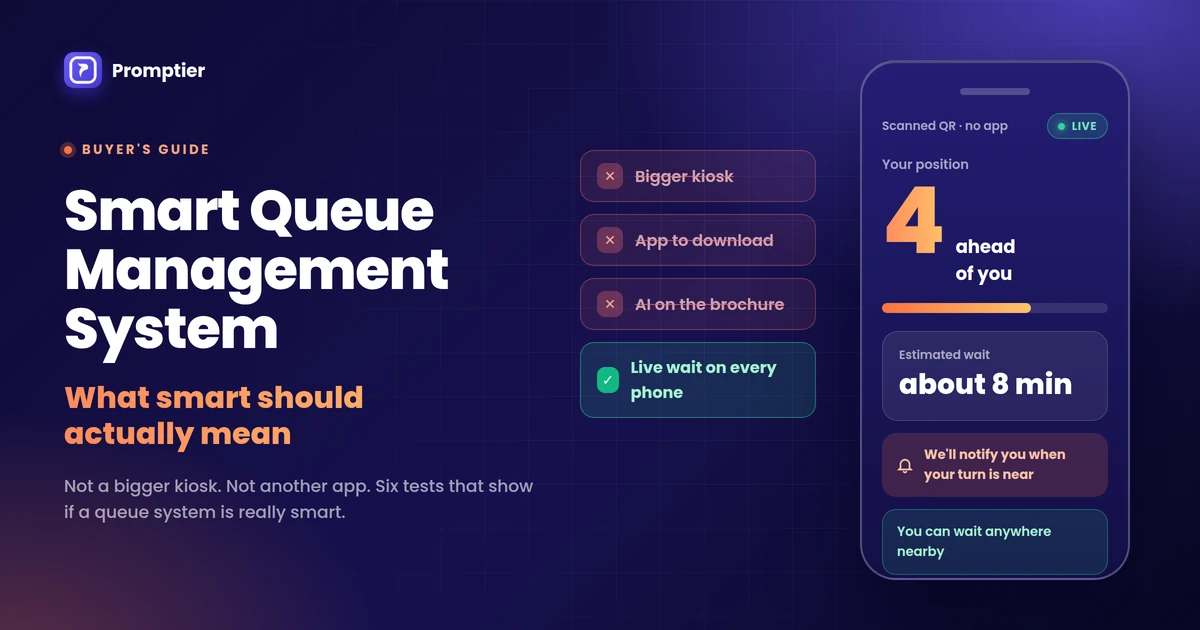
Almost every queue product now calls itself a smart queue management system. Some mean a touchscreen kiosk. Some mean an app. Some mean “AI”. For the owner of a clinic, bank branch or service centre, the word has stopped telling you anything useful.
This guide sets out what smart should actually mean: what a queue system does for your customers and staff, not what hardware or labels it comes with. Use it as a checklist when you compare options.
A smart queue management system tells every customer their live position and estimated wait, runs on the phones and screens people already have, and records every visit so you can plan staffing. It lets customers join by scanning a QR code with no app, notifies them when their turn is near, and sends each person to the right counter. Smart is about removing uncertainty and manual work, not about adding gadgets.
Key Takeaways
- “Smart” should describe what the system does for people, not the hardware it ships with.
- The most important smart feature is a live position and wait time on the customer’s own phone.
- A smart system has no single machine whose failure stops the queue.
- It routes customers to the right counter and handles bookings and walk ins together.
- It turns every visit into data, so staffing decisions are based on facts rather than guesses.
What Is a Smart Queue Management System?
A smart queue management system is software that manages how customers join, wait and get served, and keeps everyone informed in real time. Customers join from their phone, usually by scanning a QR code. Staff call the next person from a live dashboard. Every step is timestamped.
Compare that with a traditional system. A token dispenser prints a number, and a display shows which number is being served. That’s where it stops. The customer still doesn’t know how long they’ll wait, and the owner has no record of what happened.
Key terms used in this guide:
- Virtual queue: a queue that customers join and follow on their phone instead of standing in line.
- Live position: the customer’s current place in line, such as “4 ahead of you”, updated as people are called.
- Estimated wait: an approximate time until the customer is served.
- Counter routing: sending each customer to the counter that handles their service.
What “Smart” Should Not Mean
Before looking at what makes a queue system smart, it helps to clear away what doesn’t.
- A bigger kiosk. A touchscreen token machine is still a token machine. It prints a number and tells the customer nothing about their wait.
- An app to download. Asking customers to install an app at the door adds a step most people skip. The smarter route is the phone’s browser.
- “AI” on the brochure. Forecasting can help very large operations, but most clinics, branches and salons don’t need it. If a product can’t show a customer their live position, an AI label won’t fix that.
- More hardware. Every dispenser, printer and controller is one more thing that can jam, break or need a service visit.
A system can have all of these and still leave customers crowding the counter, asking “how much longer?”
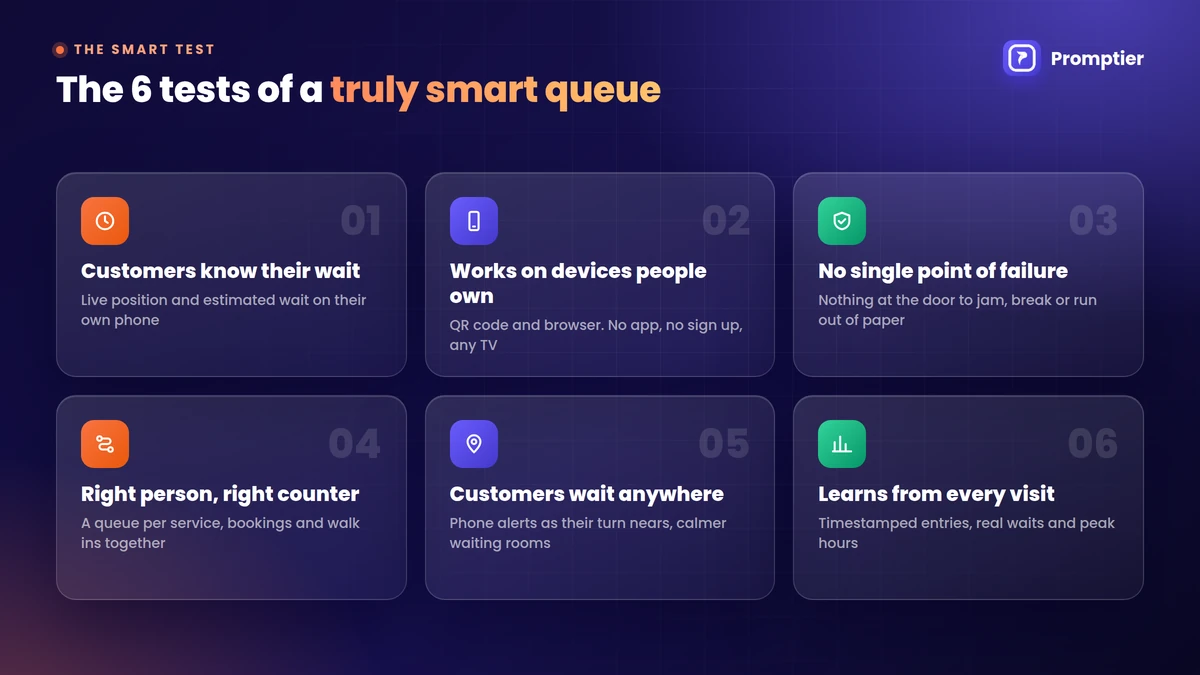
The 6 Tests of a Truly Smart Queue Management System
These six tests separate a smart system from a digital version of the old token machine.
1. Customers know their wait
The single most important test. Each customer should see their live position and an estimated wait on their phone. Service researcher David Maister showed decades ago that uncertain waits feel longer than known, finite waits. Later research on call centres found that announced wait times change both what customers expect and how costly the wait feels. A system that only shows “now serving 46” fails this test.
2. It works on devices people already own
Customers should join by scanning a QR code and follow the queue in their browser, with no app and no sign up. In India, this is easy because QR scanning is already a daily habit. UPI processed 24.51 billion transactions in August 2026, and a large share of them start with a scan. Staff should run the queue from any phone or laptop, and the waiting area display should work on any TV.
3. There’s no single point of failure
If one machine jams and the whole queue stops, the system isn’t smart. A printed QR code can’t run out of paper. Look for a system where a broken screen or a lost device is a small problem, not a shutdown. The only real dependency should be the internet, with a simple paper fallback for outages. Our cost comparison of token machines and digital queues shows what hardware failures really cost.
4. It sends people to the right place
A smart system knows that not everyone is waiting for the same thing. It should run a separate queue for each service or counter, so a two minute task doesn’t wait behind a forty minute one. It should also put booked customers and walk ins in one live list, so staff aren’t merging a diary and a token register by hand.
5. It lets customers wait anywhere
When customers are notified on their phone as their turn nears, they don’t need to stand in the room to keep their place. They can wait in their car or step out briefly. That one change makes waiting areas calmer and keeps people from walking out. Our guide to reducing walk in wait times without hiring more staff covers the operational side.
6. It learns from every visit
Every entry should be timestamped, from joining to being called to being served. That’s what turns a queue into data: real average waits, peak hours by day, and customers who left before being served. A system that can’t tell you your busiest hour isn’t smart, however modern it looks.
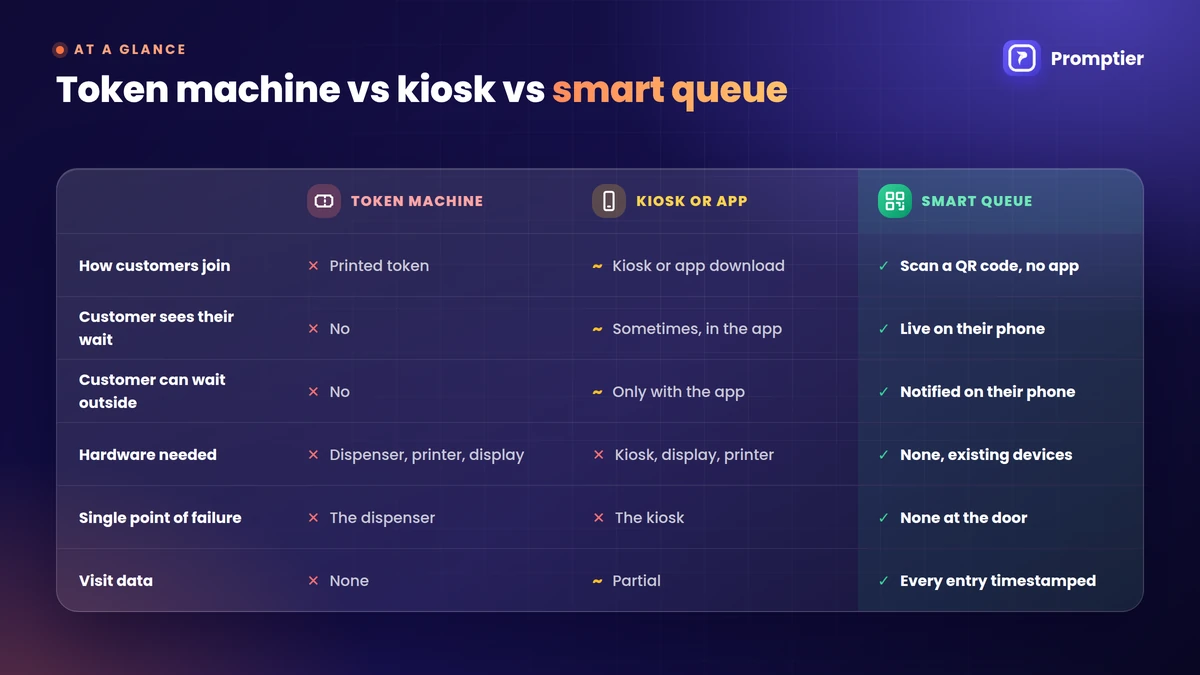
Traditional vs Smart Queue Management: At a Glance
| Token machine | Kiosk or app based system | Smart queue system | |
|---|---|---|---|
| How customers join | Take a printed token | Touchscreen or app download | Scan a QR code, no app |
| Customer sees their wait | No | Sometimes, in the app | Yes, live on their phone |
| Customer can wait outside | No | Only with the app | Yes, notified on their phone |
| Hardware needed | Dispenser, printer, display | Kiosk, display, often a printer | None, uses existing devices |
| Single point of failure | The dispenser | The kiosk | None at the door |
| Bookings and walk ins together | No | Varies | Yes, one live queue |
| Visit data | None | Partial | Every entry timestamped |
| Setup time | Vendor installation | Vendor installation | Usually the same day |
Where Smart Queues Make the Biggest Difference
- Clinics and hospital OPDs, where patients are unwell and shouldn’t crowd a waiting room. Indian patients already register by QR at government hospitals: the ABHA Scan and Register service has crossed 25 crore OPD registrations.
- Bank branches, where cash, loans and enquiry customers need different counters.
- Salons and service centres, where bookings and walk ins arrive at the same desk.
For a full overview of options and costs, see our queue management system guide for small and growing businesses.
How Promptier Passes the Smart Test
Promptier is a browser based queue system built for Indian service businesses.
- Live position and estimated wait on every customer’s phone
- QR check in with no app and no sign up
- No hardware, running on the phones, laptops and TVs you already have
- Separate queues per service or counter, with bookings and walk ins in one list
- Phone notifications as each customer’s turn nears
- Every entry timestamped for wait time and peak hour reports
- Free to start, with Pro at ₹499 per month per location
See how Promptier’s QR queue system works
Frequently Asked Questions
What is a smart queue management system?
A smart queue management system is software that lets customers join a queue from their phone, shows them their live position and estimated wait, and lets staff manage the line from a live dashboard. It records every visit with timestamps, so businesses can see real waiting times and peak hours.
What makes a queue management system smart?
Six things: customers know their wait, it works on devices people already own, there’s no single point of failure, it routes people to the right counter, customers can wait anywhere, and it learns from every visit. Hardware and AI labels don’t make a system smart on their own.
Do customers need an app for a smart queue system?
No. The best smart queue systems work in the phone’s browser. Customers scan a QR code and join instantly, with nothing to install and no account to create.
Is a touchscreen kiosk a smart queue system?
Not by itself. A kiosk that prints a token still leaves customers without a live position or wait time. A queue becomes smart when customers can follow it on their phone and the business can see data from every visit.
Does a smart queue management system need AI?
No. Most service businesses get the biggest gains from live position, notifications and timestamped data. Forecasting tools can help very large operations, but they don’t replace the basics.
How much does a smart queue management system cost in India?
Browser based systems usually charge a monthly fee with no hardware. Promptier is free to start, and its Pro plan is ₹499 per month per location. Hardware based systems add the cost of dispensers, kiosks, displays and servicing.
Conclusion
“Smart” should be a promise about outcomes. A smart queue means customers know their wait, nothing at the door can jam, the right person reaches the right counter, and every visit becomes data you can use.
Judge any system by those six tests, not by the size of its screen or the words on its brochure.
Ready to see a queue that passes all six? Explore Promptier’s QR queue system and book a free demo. No hardware, no customer app, support in IST hours.
Related reading
Leave a Reply