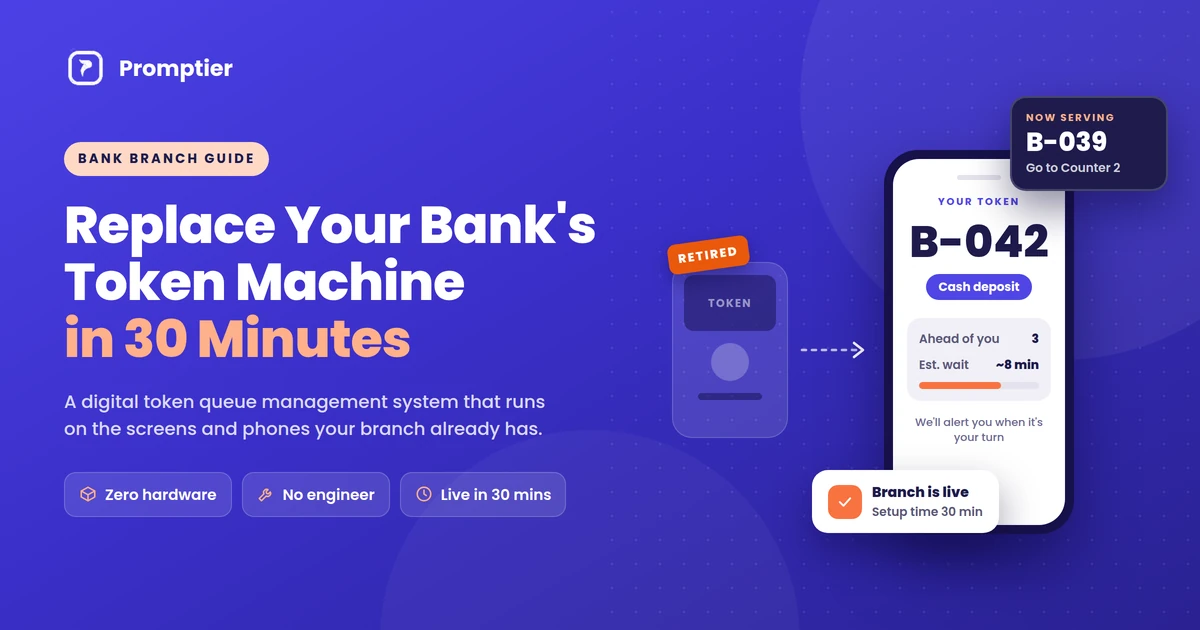
To replace a bank token machine with a digital system, you set up a token queue management system that runs on devices your branch already owns. Customers scan a QR code at the entrance to get a token on their phone. The lobby TV shows the number being served, and staff call the next token from their counter computer. With a browser-based system like Promptier, there’s no hardware to buy and no engineer visit, and a branch can go live in about 30 minutes.
Key Takeaways
- A token queue management system gives customers a digital token on their phone instead of a paper slip, while keeping the same “Token 042, Counter 3” flow your branch already uses.
- You don’t need new hardware. Your existing lobby TV, counter PCs and staff phones are enough.
- You don’t need an engineer. Setup is done in a browser: create the branch, add services, print the QR code, open the display.
- The whole switch takes about 30 minutes, and you can keep the old machine running side by side during the transition.
- Promptier’s Pro plan costs ₹499 per month per branch. A single physical token dispenser typically costs ₹9,000 to ₹40,000+ before paper and servicing.
What Is a Token Queue Management System?
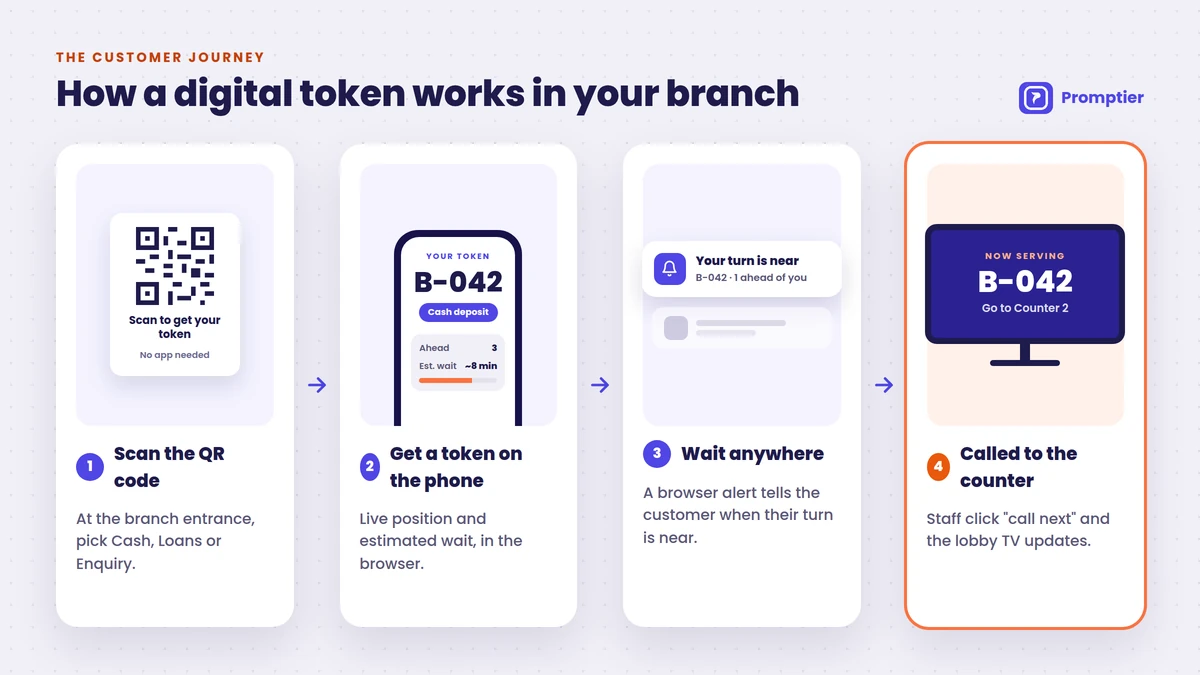
A token queue management system is software that issues numbered tokens to walk-in customers, puts them in a queue, and calls them to a counter in order. A traditional system uses a physical dispenser that prints paper tickets. A digital token system does the same job on the customer’s phone: the customer scans a QR code, gets a token number and live queue position, and is alerted when their turn is near.
For a bank branch, the digital version does three things a paper machine can’t:
- It tells customers where they stand. They see their position and estimated wait time, so they can sit, step out or finish a call instead of watching the display.
- It routes customers to the right counter. Cash, loans and enquiries can each have their own queue, so a customer who needs a two-minute passbook update isn’t stuck behind a 20-minute loan discussion.
- It records every token. Each entry is timestamped, so the branch manager can see wait times, peak hours and counter load instead of guessing.
Why Banks Are Replacing Their Token Machines
Token machines were a genuine improvement over “whoever pushes to the front first”. But the hardware has limits that show up every single day in a busy branch.
1. Paper rolls, jams and breakdowns
A thermal dispenser is a mechanical device in a high-traffic spot. Rolls run out, printers jam, and when the machine is down the queue collapses back into a crowd around the counters. Every breakdown also means waiting for a service visit.
2. Upfront cost per unit, plus ongoing costs
As we covered in our token machine vs digital queue cost comparison, dispensers in India range from roughly ₹9,000 for a basic thermal unit to ₹40,000+ for a full electronic system with a display. That’s before paper rolls, an annual maintenance contract, and replacement parts. Multiply that across branches and it adds up quickly.
3. No visibility for customers
A paper slip says “042”. It doesn’t say how many people are ahead or how long the wait will be. So customers stay in the lobby, and the lobby stays crowded.
4. No data for managers
A token machine can’t tell you which counter is overloaded at 11 a.m., what the average wait was last Saturday, or whether your loan desk needs a second officer on month-end days. Without that data, staffing decisions are guesswork.
5. Hardware-dependent upgrades
Adding a new service category, changing counter assignments or opening a new branch usually means reconfiguring or buying more hardware, and often calling a vendor engineer.
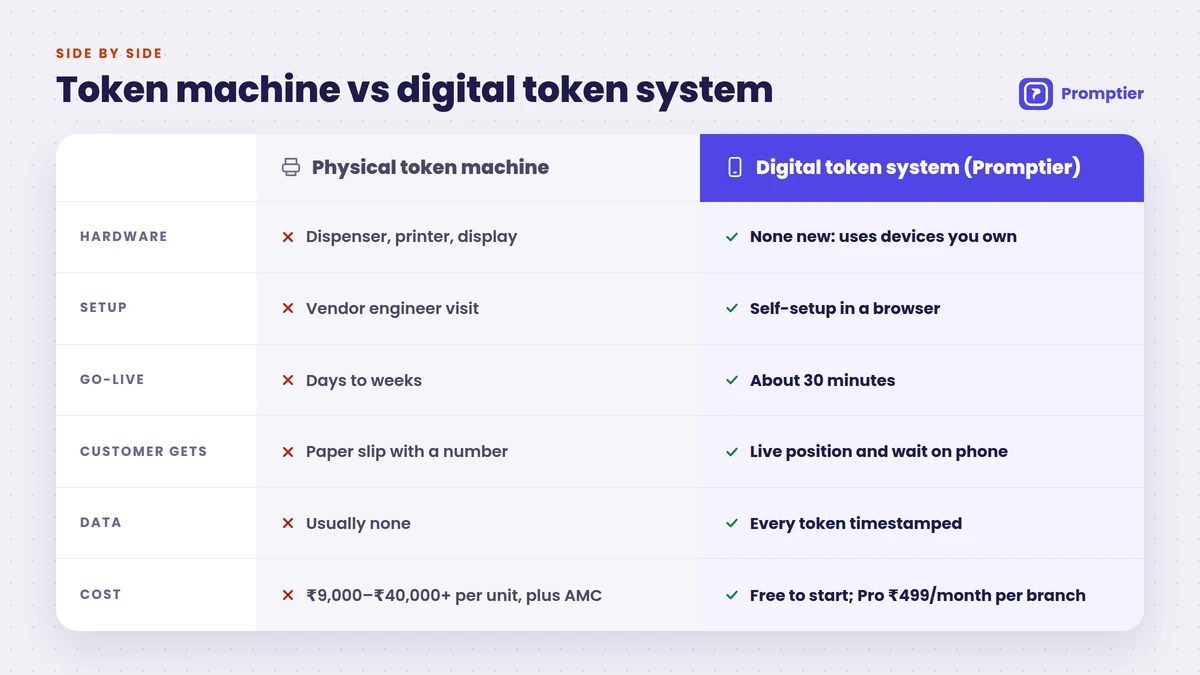
Token Machine vs Digital Token System: What Changes
| Physical token machine | Digital token queue system (Promptier) | |
|---|---|---|
| Hardware | Dispenser, printer, often a dedicated display and controller | None new. Runs on the phones, laptops and screens you already own |
| Installation | Vendor engineer visit, wiring, configuration | Set up in a browser, no engineer |
| Time to go live | Days to weeks (procurement and install) | About 30 minutes |
| Customer gets | Paper slip with a number | Token on their phone with live position and estimated wait |
| App download | Not applicable | Not needed. Works in the phone browser |
| Counter routing | Limited, often fixed by hardware | Separate queues for cash, loans, enquiry and more |
| Consumables | Paper rolls | None |
| Breakdowns | Jams, printer faults, service calls | No moving parts at the branch |
| Data and reports | Usually none | Every token timestamped; wait times, counter load, peak hours |
| Multi-branch view | Separate machines, no central view | Unified multi-branch dashboard (Enterprise) |
| Cost | ₹9,000 to ₹40,000+ per unit, plus paper and AMC | Free to start; Pro ₹499 per month per branch |
How to Replace Your Bank’s Token Machine in 30 Minutes
Here’s the switch from paper tokens to a digital token queue management system, step by step. The times are a realistic guide for a single branch with a few counters.
What you’ll need
- One person with admin access (branch manager or operations head)
- The lobby TV or any monitor with a browser (a smart TV, or a TV with a laptop or streaming stick connected)
- A computer or phone at each counter for staff
- A printer for the QR poster
- A stable internet connection
That’s the full list. No new hardware, no cabling, no engineer.
Step 1: Create your branch account (0 to 5 minutes)
Sign up on the Promptier token management system page and create your branch. Add the branch name as customers know it, so the token screen on their phone looks familiar.
Step 2: Add your services and counters (5 to 12 minutes)
Set up one queue for each type of visit. Most branches start with three:
- Cash: deposits, withdrawals, passbook updates
- Loans: applications, documentation, EMI queries
- Enquiry: account opening, KYC updates, general questions
Then assign counters to each service. If Counter 1 and 2 handle cash and Counter 3 handles loans, set it up that way. You can change it later from the dashboard without touching any hardware.
Step 3: Print and place the QR code (12 to 17 minutes)
Download the branch QR code and print it large and clear, at least A4. Place it:
- At the entrance, at eye level
- Exactly where the old token machine stands, so regular customers look in the right place
- At the enquiry desk, for customers who need help
Add one line of text under it: “Scan to get your token. No app needed.”
Step 4: Turn your lobby TV into the token display (17 to 22 minutes)
Open the display URL in the browser on your lobby TV or monitor and put it in full screen. It shows the token being served and which counter to go to, just like your old display, but now it updates the moment staff call the next customer.
Step 5: Log in your counter staff (22 to 27 minutes)
Each officer logs in on their counter computer or phone. Walk them through the one action they need: call next. It takes about five minutes to learn, because the flow is the same one they already know: call a number, serve the customer, call the next number.
Step 6: Run a live test (27 to 30 minutes)
Scan the QR code with your own phone, pick a service, and watch your token appear on the lobby display when a staff member calls it. If that works, you’re live.
Tip: Go live on a quieter weekday afternoon rather than a Monday morning or month-end, so staff and regulars can get used to it before the peak.
What About Customers Who Don’t Use Smartphones?
This is the most common question from bank branches, and it deserves an honest answer. Some customers, especially senior citizens and customers in semi-urban and rural branches, may not carry a smartphone or may not want to scan a QR code.
There are three practical ways to handle this:
- Staff-assisted entry. Because customers join through a web link, a staff member or a lobby tablet at the enquiry desk can issue the token on their behalf. The customer just listens for their number on the display.
- Run both systems during the transition. You don’t have to switch off the token machine on day one. Many branches run the digital system alongside the old dispenser for a few weeks, then retire the machine once most customers have moved over.
- Pick the right tool for the branch. If most of a branch’s customers don’t carry smartphones, or connectivity is unreliable, a physical token machine may still be the better fit there. A digital system works best where most customers have a phone in their hand.
What Changes for Your Branch on Day One
For customers
- No paper slip to lose
- They see their live position and estimated wait on their phone
- They get a browser alert when their turn is near, so they don’t have to watch the screen
- The lobby is calmer because people aren’t standing around the counters
For counter staff
- One button to call the next token
- Customers arrive at the right counter for the right service
- Fewer “how long will it take?” questions
For branch and regional managers
- Every token is timestamped, giving you a record of wait times and service times
- Live load per counter, so you can move staff when one queue builds up
- Peak-hour patterns to plan staffing for Mondays, month-end and salary days
- With Enterprise, a unified dashboard across all branches in your region
Cost: Token Machine vs Digital Token System
| Cost item | Physical token machine | Promptier |
|---|---|---|
| Upfront hardware | ₹9,000 to ₹40,000+ per unit | ₹0 |
| Installation | Vendor engineer visit | ₹0, self-setup in a browser |
| Paper rolls | Ongoing | None |
| Servicing / AMC | Ongoing | None |
| Software | Usually bundled or none | Starter free (up to 30 customers/day); Pro ₹499 per month per branch; Enterprise custom |
Most bank branches serve more than 30 customers a day, so the Pro plan at ₹499 per month per branch (₹5,988 a year) is the realistic starting point. Multi-branch banks, NBFCs and cooperative banks that want central reporting, custom branding, API access and an SLA should look at Enterprise.
Common Concerns Before Switching
“We need an IT team to set this up.” You don’t. There’s nothing to install on your systems. Everything runs in a web browser, so the branch manager can complete setup without an IT ticket.
“Customers won’t want to download another app.” They don’t need to. Customers scan the QR code and get their token in the phone’s browser. No app, no login, no OTP.
“What if the internet goes down?” A digital token system needs a working internet connection on the staff devices and the customer’s phone. Keep a simple fallback, such as the old token machine or a manual register, for outages, especially in the first few weeks.
“Will our staff need training?” About five minutes. The flow of calling a token and serving a customer is the same one your staff already follow.
“Can we try it before committing?” Yes. The Starter plan is free, with no credit card required, so you can test it at one branch first.
Your Switch-Over Checklist
- Branch account created
- Services added (Cash, Loans, Enquiry)
- Counters mapped to services
- QR code printed and placed at the entrance, the old machine’s spot and the enquiry desk
- Lobby TV showing the display URL in full screen
- All counter staff logged in and shown “call next”
- Test token run end to end
- Fallback plan for non-smartphone customers and internet outages
- Old token machine kept as backup for the first few weeks
Frequently Asked Questions
What is a token queue management system?
A token queue management system issues numbered tokens to walk-in customers and calls them to a counter in order. Digital versions like Promptier deliver the token to the customer’s phone through a QR code, show their live queue position and estimated wait, and alert them when their turn is near. No paper or dispenser is needed.
Can a bank replace its token machine without buying new hardware?
Yes. A browser-based token system runs on devices a branch already has: the lobby TV becomes the token display, counter computers or phones become the staff console, and customers use their own smartphones. Nothing needs to be purchased, wired or installed by an engineer.
How long does it take to switch from a token machine to a digital system?
With Promptier, a single branch can go live in about 30 minutes: create the account, add services and counters, print the QR code, open the display on the lobby TV, log in staff and run a test token. Staff typically learn the dashboard in about five minutes.
Do customers need to download an app to get a digital token?
No. Customers scan the QR code at the branch entrance and get their token in their phone’s web browser. There’s no app to install and no account to create, which matters for customers who visit the branch only occasionally.
How much does a digital token system cost for a bank branch in India?
Promptier’s Starter plan is free for up to 30 customers a day. The Pro plan costs ₹499 per month per branch, with unlimited queue users. Enterprise pricing for multi-branch networks is custom. By comparison, a physical token dispenser typically costs ₹9,000 to ₹40,000+ per unit, plus paper and servicing.
Can we run the old token machine and the digital system together?
Yes. Many branches run both during a transition period. Regular customers can keep using the paper machine while others scan the QR code, and the branch retires the dispenser once most customers have switched. It’s also a sensible fallback for customers without smartphones.
Conclusion: Retire the Paper Roll, Not the Process
Your branch doesn’t need to change how it serves customers. Token numbers, counters and a display on the wall all stay. What changes is the part that keeps breaking: the plastic box, the paper roll and the service call.
A token queue management system that runs on your existing screens and your customers’ phones gives you the same familiar flow, plus live wait times for customers and real data for managers. There’s no hardware to buy and no engineer to schedule, and your branch can be live before the lunch rush.
Ready to retire your token machine? Replace your token machine free with Promptier. No credit card needed. Support in IST hours, Monday to Saturday.
Related reading